

How to render in AutoCad ?

Rendering in AutoCad 2012
24 Answer

I'm not quite sure about AutoCAD 2012 but it will be quite similar to 2011.
Answered with a tutorial: https://grabcad.com/tutorials/how-to-render-in-autocad

Export your model to the fusion-technology (integrated in AutoCAD 2011 & later) or render with Autodesk Showcase.
What i like most about AutoCAD rendering is the SUN. You can use the sun settings for the shadows etc. Well as Kirk said, rendering in AutoCAD is not very good as compared to Bunkspeed, PhotoView 360º etc.

Well actually, if you know what you're doing, rendering in AutoCad gives you similar or even better results than PhotoView360 or something. Ever fiddled around with the advanced render settings? Guess not. Never rely on the predefined render quality settings. They suck.
There is mental ray in AutoCad as well! Same render engine used by SolidWorks and Inventor for instance and of course most of the CGI movies like Toy Story or such.
Search the nVidia site for mental ray to learn more! I highly recommend this.
THEN you know about things like "ambient occlusion", "final gather", "global illumination" and so many more shader types and stuff, which are implemented into AutoCad in a really useful way. THEN you will know how to produce the difference between thin-walled glass objects or solid glass objects. THEN you will know about setting up your materials right in order to get the right bump-mapping, relief-patterns, cutout-patterns, transparency, translucency, reflections and refractions, self-illumination and so on and so forth. THEN you will know about caustics and such. THEN you will know about setting up the (very versatile) different types of lights. THEN you will know about portal light and other very cool stuff. THEN you will know about sampling settings to produce the finest edges instead of coarse lines. THEN you will know about photon emission and appropriate radius settings. THEN you will know about how to control the number of "bounces" of indirect lighting and how they part into reflection and refraction. THEN you will know how to control shadows properly. THEN you will know how you are able to simplify your geometry, use the right type of material instead and let the render engine do the magic.
The list goes on for a while, so: get informed!
YES, mental ray in AutoCad is "pre-set-up" in a great way, so don't bother trying to understand every single variable to the vast variety of shaders, because you will not be able to affect those directly in AutoCad. And YES, there are certain limitations to the flexibility of different shaders in AutoCad. Nonetheless you will create mind-boggling results in AutoCad once you DO know what you're doing.
YES, PhotoView360 is set up in a way suitable for loads of engineering purposes, BUT once you want to dive into architecture or similar it is pretty much useless, since it does not offer the individual flexibility you simply need for presentable results.
In fact, the only applications I know, which offer more flexibility and control of the rendering process are 3ds max and maya when it comes to mental ray (or even blender if you're going for "cycles" or whatever their render engine is called). BUT not only do they offer more flexibility, but they are much more complex to use. AND the underlying method of modelling is a whole different story, which is not actually meant for engineering or architecture.
If you want to render really good, then learn about mental ray, learn about how to set it up in AutoCad and use AutoCad. Once you've done that, you will not want to return to PhotoViwe360.
That's at least my experience!
Thanks for reading this whole sermon.
Best regards and happy learning!
Oh, I forgot to mention:
1: Turning on the "full shadows" does not affect the render at all. It only turns on and off shadows in your viewport. This is only to get a first look BEFORE you actually render. (Same goes for the "default lighting". It only controls your viewport, but does not affect the render at all. In fact both settings are mostly useful to reduce your system speed in a great way when constantly turned on ;-)
2: Turning on the sun is absolutely NOT what makes "realistic shadows". "Final Gather" and "Global Illumination" (FG / GI) make "realistic shadows"!!!
Specify some lights instead, open the "advanced render settings" dialog, make sure FG and GI (or at least FG) are turned on, then render with really cool "realistic shadows".
The point is, that FG and GI are only turned on when the sun is turned on as well, but that goes SOLELY for the predefined, default render settings. MAKE YOUR OWN! Then you'll get THE most "realistic shadows" regardless of AutoCad sun-status and daytime!
In addition, consider setting up a geographic location, direction and elevation above sea-level. Sun-settings offer many, many, many and then even many more cool things like height of horizon, atmospheric effects, color of sun light and color and size of the sun disc etc. etc.
BOY I could go on for hours over this topic, but just inform yourself about the atmosphere for instance. Oh, you think the atmosphere is clear like a crystal? Well, it is not. In fact it is somewhat milky, which you can notice when looking at the color of objects from great distances. The greater the distance the more ALL color fades to grey! (You should have a look at scale model building, where the real experts brighten up all prototype colors more and more the smaller the scale of the model is to get that realistic look!).
Thanks for reading
Best regards.

I learned the hard way... By myself! There will be quite a bit of reading here, but I'll share a few good tips you may not be aware of. I've been using AutoCad 2006 through 2008. What I found is that when drawing in 3D, the biggest hurdle was keeping track of the UCS orientation. Otherwise you might become lost in 3D! What I've done is create a template where I've taken all the standard views and saved them to custom views. That way I always have the correct UCS orientation for that view. (Add the NE NW SE & SW last, otherwise it will goof up the UCSs for the "flat" views. Once you have your model drawn (solids, surfaces, etc.) create layers for each different surface type you need (wood, glass, steel, chrome, etc.) and put each object on the appropriate layer. Once you've done that, before changing to any other custom view, go to custom views and "update layers", otherwise the layers you've added for your surfaces will "disappear". Not to worry if you forget though, just go to layers and turn therm back on. Then update layers! At this point, the layers are only layers with global settings, so go to "Materials" and create materials for each of your layers. For stainless steel pick advanced metal, add a bitmap (BMP, JPG) of a desired metal to the "diffuse map" (slider full up) and a bitmap map to the "reflection map". I usually use "car3" from Inventor for relfection, about 1/2 to 2/3 up. For chrome, use "car3" for both. (I occasionally use photos i took of Christmas balls) If you want the objects to be heavily textured, add a "Bump Map". You can adjust the size of the "bumps" by un-syncing the bump map and adjusting it's size. The Bump map intensity control is a bit extreme! i usually go with 14 or -14 (lowest possible) Then attach the material to the layer (command prompt "materialattach", drag and drop). Bear in mind that you can take any photo and use it for material or background. To make it easier to find bitmaps for materials, I keep my favorite ones all sorted by type in folders, where i know how to find them. When rendering any kind of metal, be sure you have filleted all the edges of your solids which are metal. With all the corners completely square, you'll never get it to really look like metal. Make the radiuses a bit larger than real life measurements. Then add a few lights. Usually I use spotlights, one at intensity factor 1 for main lighting and shadows, and another 1 or 2 at a much lower intensity to provide "ambient" light. If you want a tight bright reflection, drop the hotspot angle and falloff angle down. For all lights, enable "targeted" and be sure to set the target point to where you want the light to hit your model. Since lighting in AutoCad is by design very much like real-life light, getting the angles correct for the desired result will take a bit of adjustment, and will be specific to your rendered view. Regarding picking your rendered view, usually I start with a saved view of SE, SW, NE, or NW ISO, open 3DOrbit, right click to pick perspective (parallel is default) and tweak to suit, getting the entire view and angle you want. Then go to manage visual styles, pick realistic, and turn on your shadows and turn off "isolines". Click on "create new visual style" and save as any name you want. Then save it as another custom view. The last step is to select RPREF (advanced render settings). As done for custom views, save a copy of the default settings (draft, low, medium, high & presentation) by clicking on "Manage Render Settings" but click on shadow map to allow shadows, Then select your output size.
I often use 2048 x 1536 at "High" for finished drawings. I'll use "Low" at 640 x 480 to get a quick idea if the view and all the materials are good. I seldom use "Presentation" since it takes so much longer, and is not that much better than "High". Bear in mind that rendering may still take quite a long time at "High", so do your "pre-flight" checking at "Draft" or "Low"... or "Medium" if "Low" doesn't give you a feel for how the materials' will look.
I hope this has been helpful!

Hello here is a video I made quickly explaining the settings with the sun and light with autocad

We put a video on YoiTube to give you some ideas:
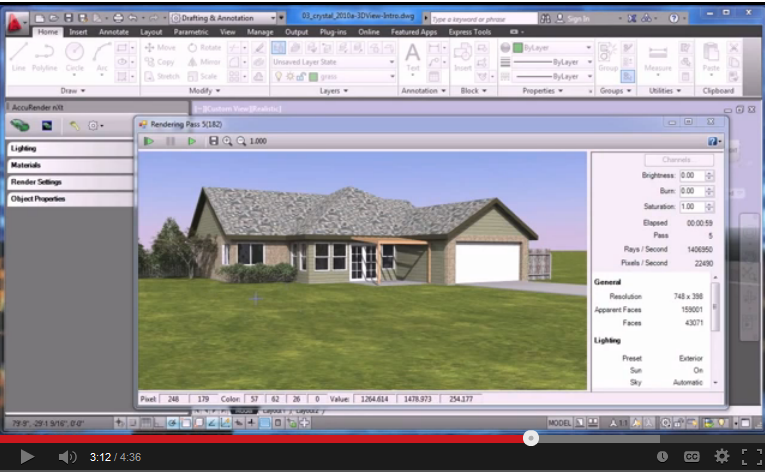

amazing

your procedure of rendering working and it really helpful .thaks you

I agree with L J Smee mental ray in auto cad can produce fantastic images
if you know how to use it properly getting lighting right is tricky at first but
with practice it gets easy

Export your AutoCad 3D model to Navis Works. You can render, make a movie and even make a walk anywhere movie. I do to all of my models. I've made a walk anywhere model <Cement plant layout-a navis works presentation> I've given the contents in this model.
Export your Autocad 3D-model to navis works. From here you can add colors, material, Choose the sky of a particular country, lighting and host of other features. You can make a movie or walk anywhere model. You can even make photos. Read my introduction. I've given the link for "Freedom" a free software of Navis works and created a cement plant model. If you have any questions, then you can ask.
Actually, I was getting STUNNING render results in native AutoCAD back in the 2000i days. 2006 was even better, 2008 was a bit of a step backward, but with the right settings came back and was again an EXCELLENT tool, and these days, really great renders can be achieved in NATIVE AutoCAD (the original intent of this thread).

Greetings
Dear friend, in this case I would refer you to this software tutorials:
http://www.sharemation.com/ghkmn/CAD14.pdf
http://www.box.net/shared/isb3m6cbg9
A three-part series
http://www.vojoudi.com/civil/autocad/education/auto06_01.pdf
http://www.vojoudi.com/civil/autocad/education/auto06_02.pdf
http://www.vojoudi.com/civil/autocad/education/auto06_03.pdf
Good luck.

Attached are the renders i made only from cad (pure, no photoshop, max, vray etc).
Render time (kitchen) 5 hrs...lol


i use accurender3.3 for all my autocad rendering

for better result use autodesk inventer fusion...

By using RR command you can go direct to render screen. Give ur required specifications.. And render and save image from top lower left. Done ;)

Free Tutorial Autocad Rendering + File 3D .Dwg + Ebook .Pdf
Tutorial AutoCAD 1 Choose Materials >> http://wp.me/pKugu-2N0
Tutorial AutoCAD 2 Apply Materials >> http://wp.me/pKugu-2OW
Tutorial AutoCAD 3 Create Cameras >> http://wp.me/pKugu-2OY
Tutorial AutoCAD 4 Render Settings >> http://wp.me/pKugu-2P0
Download File 3D Dwg >> http://wp.me/pKugu-2Pa


Not helpful
Try to transpose your Auto cad model into Navis works. You will get a real effect. I did. Wiew my models.

use the "render" command, don't expect very good results.


