
Ask and answer questions and download tutorials

Thousands of tutorials to learn from

Feed

How to create a word on a cylinder?

By EDISON PHOENIX on 17 Apr 20:57 4 answers 1355 views 3 comments

How to create a word on a cylinder?

Added images

Square

4 answers

  • EDISON PHOENIX
    EDISON PHOENIX about 1 year ago

    BASIC TUTORIAL TO CREATE A CYLINDER & TEXT ON IT.
    CTRL+I - ISO view.
    CTRL+H - Sketch view.
    Right click - Accept.
    Middle click - End command.

    1. Step 1

      Start Solid edge with a new ISO part model.

      Medium

    2. Step 2

      Select FRONT plane.

      Medium

    3. Step 3

      Draw the below sketch.

      Medium

    4. Step 4

      Then EXTRUDE symmetrically to 200mm.

      Medium

    5. Step 5

      In RIGHT plane create a TEXT using TAXT PROFILE tool ....

      Medium

    6. Step 6

      Place it at center.

      Medium

    7. Step 7

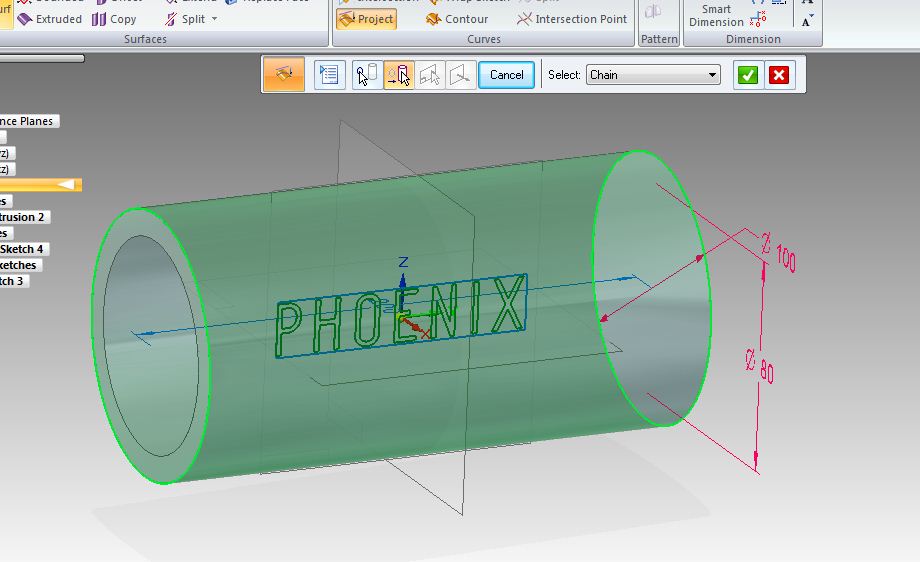
      Using project in SURFACING TAB.. You can project the TEXT on the cylindrical surface..
      1.sketch

      Medium

    8. Step 8

      2.surface

      Medium

    9. Step 9

      3.Direction & FINISH.

      Medium

    10. Step 10

      Text on Cylinder.

      Medium

Add your answer to: "How to create a word on a cylinder?"

Save Cancel