

Learn about the GrabCAD Platform
Get to know GrabCAD as an open software platform for Additive Manufacturing
Visit our new homepage

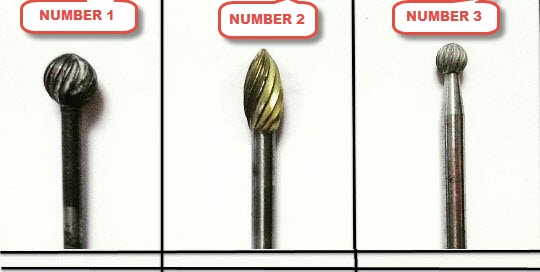
can anyone help me to how to drw it? how can i draw a curve like number 1 on the sphere?

A photo with steps is attached.

There are other ways you can 3D sketch directly on the sphere, but I think doing it in 2D is a lot easier to work with and understand.
Give it a try.
thanks a lot. could you please help more. i do not understand step 3 and 4 in your pics.
Picture 3 is an extruded surface. You could use an extruded boss instead if you are more comfortable with solid bodies, but a surface is the better option.
Picture 4 is an intersection curve. It is a lot like the Convert Entities tool, but this one gives a line/curve at the intersection of multiple bodies. Check the help file for details on the tool. In this situation I'd use it while in 3D Sketch mode.
This video shows the intersection tool pretty well: https://www.youtube.com/watch?v=jEyzG0LRtW4
One of the best ways to understand the process is by doing it.
Follow the steps above. If you get stuck, post what you've made and people will have a better idea of what needs to be fixed.
i have only one question in these step. after doing curve intersection i shoud draw a 2D shape at point of intersection curve line that is perpendicular that point
?
Yup.
In my case the intersection curve starts and stops on one of the default reference planes, so I just used it.
If you had to, you could make a new plane which is perpendicular to the curve, but I think you'll have the best results by using one of the default planes.
People often make a plane perpendicular to a helix when cutting a thread, but that is the wrong approach.

