

Learn about the GrabCAD Platform
Get to know GrabCAD as an open software platform for Additive Manufacturing
Visit our new homepage

which one is a good practice to dimension a part like given below?
orange dimension vs. red

auxiliary view?
Yes, detailing is giving enough information to build/cast/machine the part so the machinist doesn't to make a phone call.

The standard is black. Red should only be used when marking up a drawing for a correction, also know as "Redline Drawing". But if you want to ignore these rules, red looks better then orange.
You can also dimension the full drawing in black and dimension the "Critical" dimensions in red. But you would have to add a note to the drawing that says something like "Dimensions In Red Are Critical To Function".
-OMNICAD
It would be difficult to place the normal/auxiliary view for many holes.

This is very true. I have run across this issue several times. It is a good practice to know your fabricators and build a good working relationship/good line of dialog.
That is what a drawing is, just communication, documentation and history.
How much time (average) should be taken by a cad engineer having 2 year experience to prepare fully dimension drawing of this part?
Well, first you need a casting drawing. This will give you the basic shape. I see a ton of radii in all the corners. You won't be machining that. Then there is the detail drawing for machining.
A machining detail drawing of this part could take a few hours depending on the intent of the designer.
Thanks Chuck

The most important thing about detailing is removing ambiguity and the chance for interpretation mistakes. Put your self in the shoes of the person reading the print and do what makes the information the most clear.
Personally, I show the part in black, centerlines and virtual sharps in blue, and dimensions in green for clarity.

There isn't a hard rule here, at least not per ASME Y14.5. A 'normal' view would be necessary if you also had an array of holes on this surface; say, for bolting/locating. For single outlying features, this method is fine, but your drawing needs some work in properly defining the positions and relations to your centerline.
What does the datum structure look like for this part?
As for print colors on text, dimensions, etc... most of the shops we work with make prints in black & white. Even when given a nice PDF, the machine shop guys will print in B&W for their work.
If something is important, tolerance it as such and drive it back to your datum features. A full use of GD&T language will eliminate most every ambiguity.

soon drafting will be replaced by MBD. think like a person who is going to read/machine/cast it.
I would modify that in saying... think like the person who's going to inspect it.
If we thought like most machinist, every rectangular block would have its datums set to the top left-hand corner, regardless its functionality.
What should be expected maximum time taken by 2 years experienced designer for preparing the machined detailed drawing of this part?
like 3 hrs or 6 hrs.
I work in a small startup company which makes simple parts like circular cutters and rectangular cutters. Now i want to switch company. So i am afraid if i am below a cad engineer's standard. performance.
What should be expected maximum time taken by 2 years experienced designer for preparing the machined detailed drawing of this part?
like 3 hrs or 6 hrs.
I work in a small startup company which makes simple parts like circular cutters and rectangular cutters. Now i want to switch company. So i am afraid if i am below a cad engineer's standard. performance.
thanks for correcting me.
Depends... when you look at this part, does it strike you as something you could work through without issue or, are there features you don't know how to properly convey in a drawing?
If the latter,figure on 6+ hours... with help.

The standard dimensioning is considered in black. Red should only be used when marking up a drawing for a correction, also know as "Redline Drawing". But if you want to ignore these rules, red looks better then orange.
What I thought was common nomenclature was a "redline drawing". In every company I've worked at, a redline drawing wasn't a drawing at all, it was simply a first-pass drawing that was marked up through the manufacturing process.
Say a machinist finds a missing dimension, he/she would bring that to the attention of the designer, who would then (in red ink) add the dimension along with initials and date. The manufacturing process continues without interruption. Once manufactured, the print is returned to engineering so that "redline" corrections/additions can be added to the model/drawings/etc.. This is usually (in my experience) the point at which a design is pushed to the next revision, which may only signify that the design has in fact seen one round of manufacturing. But that varies company to company.
Thank you very much for explaining the redline drawing concept.

I don't think the question was of color. I think the colors were so we could say which version of dimensioning the hole was better.
If you were asking if the orange method or the red method was better to call out that feature, I would say that there is no hard and fast rule, but the red callout shows it better
Redline drawings are used to show corrections needed to a drawing. They are done with a red pen. This could be at the beginning stages that a drawing is made, and even years after a drawing has been used for manufacturing. Revision changes coming from client/customer or Revision changes internally would cause for the use of a redline drawing.
Like I was saying earlier in this thread, you can also use red leader lines and numbers to show critical dimensions on a drawing. But you would have to add a note that says something like "DIMENSIONS IN RED ARE CRITICAL TO FUNCTION".
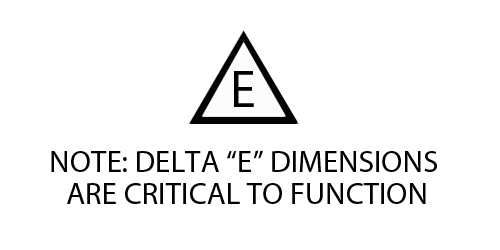
The most common ways to show critical dimensions is to use a Delta E symbol (image attached). But sometimes when dealing with companies internationally they will/might ignore the delta "E" note and symbol. So using the Red Dimensions would be a good way to show a manufacturer that the dimensions in red are critical.
Thanks,
-OMNICAD
After using auxiliary/normal views, the drawing has become like below. Although drawing is not fully dimensioned. i want to make sure if i am on right track. Please let me know if i am wrong.
Thank you

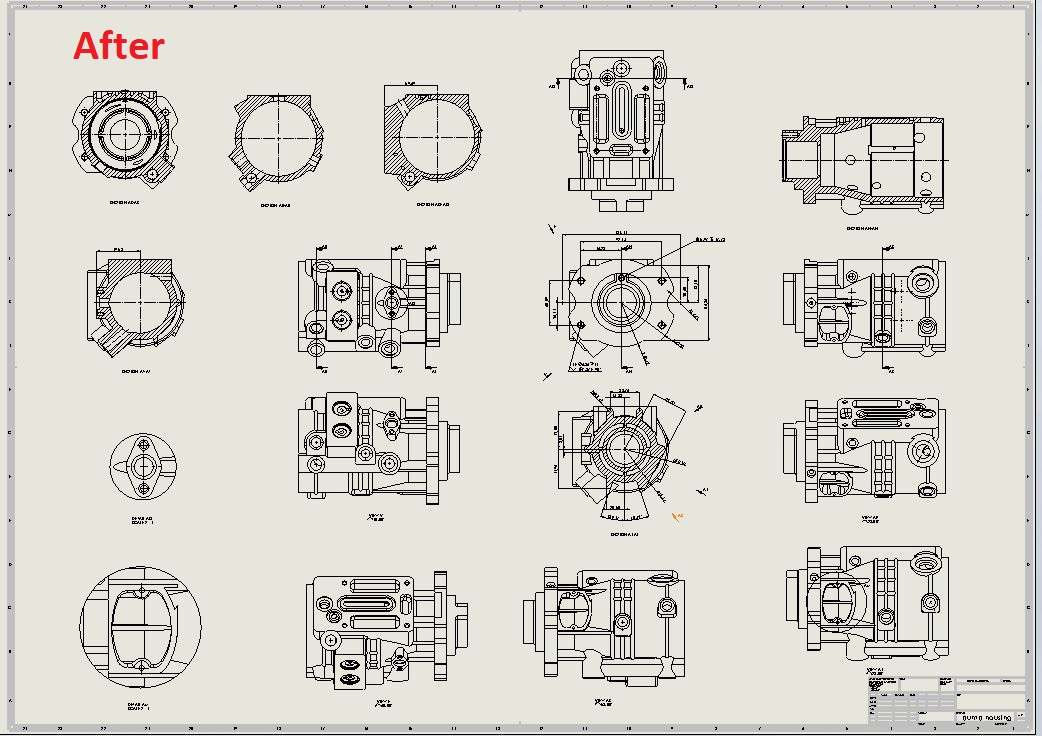
Thank you OMNICAD,
Please have a look at the above post.
Rajat,
You are on the right track. One thing Engineers do is "Over Engineer Drawings". This is a complex model to dimension. I have questions. What is this drawing for; school, a client, are you sending this to a manufacturer? I need to know, because there are different methods for each of what I'm asking.
Thanks,
-OMNOCAD
Thank you omnicad for your reply.
I want to improve my drafting skill as i am working at a small startup company that manufacture small basic parts/machines like circular, rectangular cutters and special custom machines. I get this model from Solidworks website as a sample and started drafting that model.
If i want to prepare this drawing for manufacturing. Is this the right way?
The method that my company uses to prepare drawings to send out to another manufacturer is as follows.
Hope this helps!
Any more questions just ask!
Thanks,
-OMNICAD

