

Learn about the GrabCAD Platform
Get to know GrabCAD as an open software platform for Additive Manufacturing
Visit our new homepage


Good Morning,
I have a problem in curve surface thickness. I have made a model of full face helmet in the surface tool, but it's not getting thick. Can you please provide the solution for this?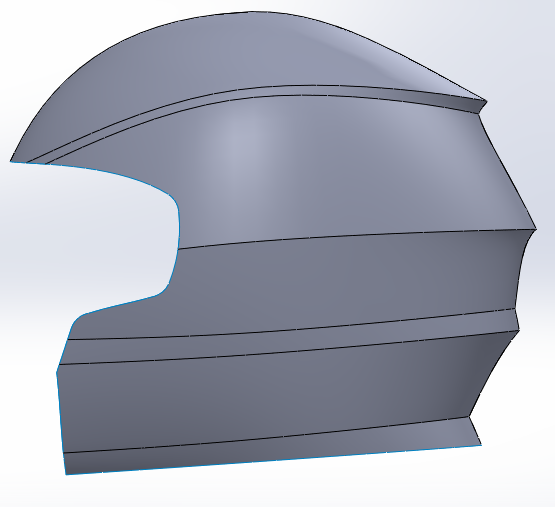

before applying thickness command. all surface is properly knife and merge.

I don 't know how to upload the file in the group. Will you please help me?

If Thicken Surface won't work it's most of the time because of a geometry error on the inside of a small bend. Does a thicken 0.1mm work? If so, try how thick it can be made. If not, than your surface is probably not knit properly to one surface. Try to remove the small bends and make them afterwards with a cut sweep
You can upload on your profile or share dropbox link


Which is translated into:
"Upload the template to help you"

There could be a lot of reasons why you can't make the thicken feature work. What thicken does is the following: Creates an offset surface from the one you made and then connect them with (probably) ruled surfaces. It can make minor corrections, like extend the offset surface where it's needed so the faces can meet. After that it trims and knits the surface bodies together and tries to form a solid. If it's unable to complete any of the above, thicken will fail.
Most of the time the offset will be the problem (at least that's my experience), but also quite often you can complete the process manually, making the offset from multiple pieces.
One thing is sure: thicken will not work unless you are willing to modify your original surface body. Which can be OK, if the problem comes from the poor quality of the surfaces, but otherwise it usually takes you further than you'd like to go (if anywhere).
If you're satisfied with your surface and don't want to change it (which is likely the case here and now - you could check curvature combs, but it generally looks nice and clean to me) then you have to use an alternate method instead of thicken.
The next thing that comes to mind is to trick SolidWorks to do the work by using some other features (like creating a big solid by some simple flat surfaces then use the shell feature and cut the slack). There is a chance of success, but I would generally advise against that, because behind the curtains SW probably uses the same algorithms for features with similar outputs, and also it has a strong tendency to freeze or generate an exception when you try to make it do things it doesn't want.
Anyway, I found that manually going through the process is usually the fastest way in these kind of situations.

