

SideScan Sonar

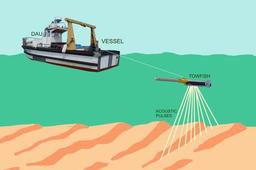
A Sidescan Sonar uses high-frequency sound pulses that are bounced off the sea floor to create an image of the sea floor morphology shape) and show differences in seabed texture and substrate types.
In this Tutorial more understanding about Sidescan Sonar. Enjoy :)
Credit goes to: http://oceanecology.ca/wp/2015/08/20/sidescan-sonar/
-
Step 1: What is Sidescan Sonar or (SSS)
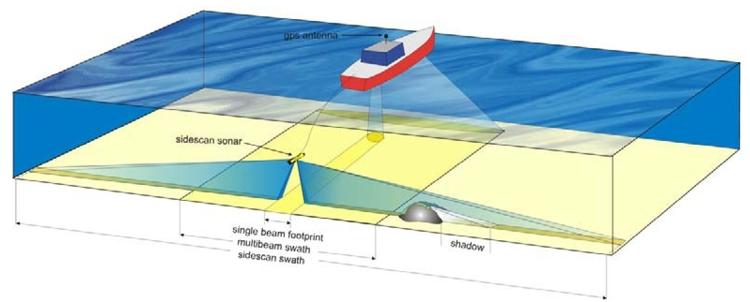
Sidescan sonars use a swath of sound to survey the seafloor. They differ from single-beam sounders in that they have a much larger footprint shape.

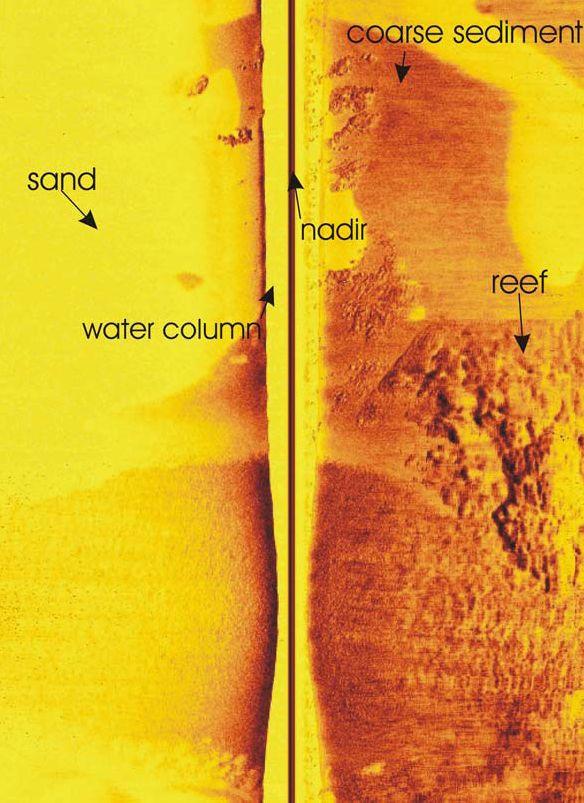
However, like single-beam systems, they generate two main types of data, depth (or bathymetry) and backscatter. Traditionally, side scan sonars provide better backscatter data than depth data. They are often used to create a wide, often almost photo realistic image of the seabed using backscatter intensity.
-
Step 2: SSS
Sidescan sonars are used to map the seabed for a wide variety of purposes, including creation of nautical charts and the detection and identification of underwater objects and bathymetric features. They are often used to conduct surveys for marine archaeology, and assist in locating and identifying underwater anthropogenic artifacts. In conjunction with seafloor samples, sidescan sonar can be used to classify the seabed based on material and texture type. Sidescan sonar imagery is also a commonly used tool to detect debris items and other obstructions on the seafloor that may be hazardous to shipping or to seafloor installations by the oil and gas industry. In addition, the status of pipelines and cables on the seafloor can be investigated using sidescan sonar.
Sidescan data are frequently acquired with bathymetric soundings and sub-bottom data, thus providing a glimpse of the shallow structure of the seabed. Sidescan sonar is also used for fisheries research, dredging operations, and environmental studies.
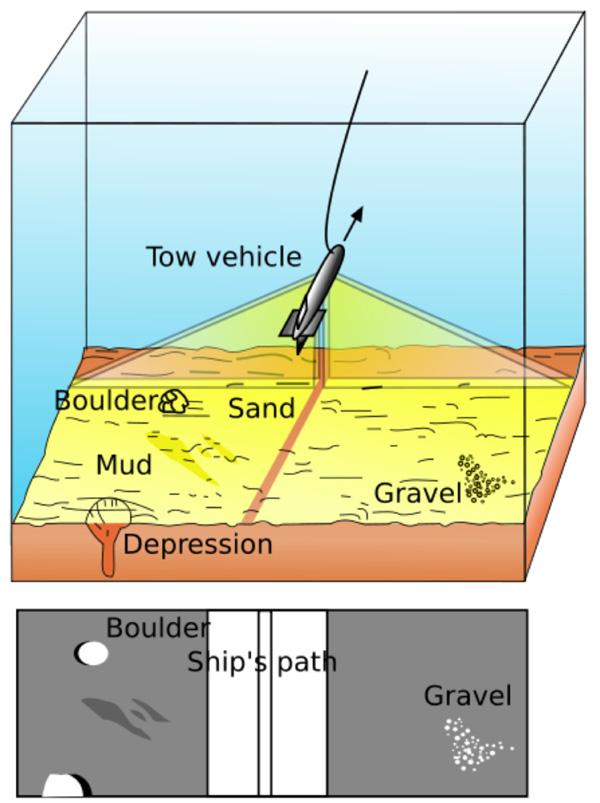
Sidescan uses a sonar device that emits fan-shaped pulses down toward the seafloor in a direction perpendicular to the path of the sensor through the water. The sensor may be towed from a surface vessel (e.g., mounted on a “towfish”) or mounted on the ship’s hull. The intensity of the acoustic reflections of the beam from the seafloor is recorded in a series of cross-track slices. When stitched together along the direction of motion, these slices form an image of the sea bottom within the swath (coverage width) of the beam. The sound frequencies used in sidescan sonar usually range from 100 to 500 kHz; higher frequencies yield better resolution but less range.
-
Step 3: Sidescan Sonar Ranges
Side Scan Sonars provide sophisticated digital pictures of the sea-floor surface. Common applications for side scan sonars include; accurate mapping of large sections of the seabed; overall sidescan survey to locate pipeline or cable routes, seamounts, obstructions and other features. Specifically, shipwreck location, mine hunting, downed aircraft search and lost cargo operations all require the use of side scan sonar.

The side scan sonar transmits a narrow acoustic beam to the side of the survey track line which propagates out across the seabed. As the acoustic beam travels outward from the side scan sonar, the seabed and other obstructions reflect some of the incident sound energy back in the direction of the side scan sonar (known as backscatter). The travel time of the acoustic pulses from the side scan sonar are recorded together with the amplitude of the returned signal as a time series and sent to a topside console for interpretation and display.
Tritech SeaKing Side Scan Sonar Systems are available in two assemblies; an ROV or AUV mounted system which has separate transducers that are mounted on either side (port and starboard) of the survey vessel or a Towfish Side Scan System. The Towfish side scan sonar system has a hydrodynamic shape and resembles a torpedo or missile with a long body containing the transducers and electronics and a set of tail fins to keep the towbody in line with the tow track. The Towfish side scan sonar is normally towed behind and below the surface survey vessel.
As with any acoustic sonar, side scan sonars only show echoes of objects that reflect sound back to the side scan sonar transducer, such that hard shiny surfaces are sometimes only seen when they are at right angles to the side scan sonar and rough seabed textures can blot out smaller targets completely. Some types of material, such as metals, boulders, gravel or recently extruded volcanic rock, are very efficient at reflecting acoustic pulses (high backscatter). Finer sediments like clay and silt, on the other hand, do not reflect sound well (low backscatter). Strong reflectors create strong echoes, while weak reflectors create weaker echoes. Knowing these characteristics, you can use the strength of acoustic returns from the side scan sonar to examine the composition of the sea floor.
Interpretation of side scan sonar data develops with experience. Side scan sonar reflections of isolated small objects give no indication of shape or attitude. Manmade structures, such as platforms or rock walls tend to have regular patterns that are easier to identify. Using a side scan sonar is rather like looking at a world made of shiny black plastic, in the dark, with only a narrow torch beam for illumination. Remember that when close to large objects, or in a depression in the seabed, that the viewing range of the side scan sonar may be severely limited. Very strong reflectors may give multiple echoes along a bearing line, and are identified by being equispaced in range. The plan view provided by the side scan sonar also does not show how high an object is, unless an acoustic shadow is cast, in which case the length of the acoustic shadow is related to the height of the object, its range, and the height of the side scan sonar.
-
Step 4: Sidescan Sonar Ranges

Experience with the side scan sonar will enable the side scan operator to be able to quickly and effectively set controls such as receiver gain and dynamic range to give as even a background as possible, without swamping the side scan display, and maximise the performance capabilities of the side scan sonar. Separate controls are available for Port and Starboard side scan transducers. Although normally the settings would be the same, under some conditions (e.g. sloping seabed) different settings may be needed from port to starboard.
Underwater, sound transmission is limited. This is most notable in useable ranges. The usable range of high frequency sound energy is greatly reduced by seawater, typically to around 50 to 100 metres. Low frequency sound energy is reduced at a much lesser rate with usable ranges of in excess of 200 metres achievable. Therefore, a tradeoff exists between higher resolution images produced by a high frequency side scan sonar and the longer range provided by a low frequency side scan sonar. Tritech SeaKing Side Scan Sonar Systems are normally supplied with one of two operating frequencies, typically 325 kHz and 675 kHz. The lower 325 kHz frequency side scan sonar is capable of detecting large targets at ranges in excess of 200 metres. The higher 675 kHz frequency side scan sonar has a narrow beam and shorter (100m) range for more detailed images of closer targets.

-
Step 5: Humminbird 997c SI
Ocean Ecology developed a sidescan sonar towfish based on the Humminbird 997c SI unit.

Ocean Ecology’s towfish.
This unit has a traditional downward-looking sonar combined with a side imaging sonar.
Specifications of downward-looking sonar:
- 200 kHz beamwidth at -3dB = 14°
- 83 kHz beamwidth at -3dB = 42°
- 50 kHz beamwidth at -3dB = 52°
- Transducer depth range: approximately 450 m at 83 kHz or 900 m at 50 kHz
Specifications of HDSI (high-definition side imaging) transducer (best for shallow water use):
- 455 kHz
- Horizontal beamwidth at – 3dB = 1.7°
- Vertical beamwidth at -3 dB = 59°
- Transducer tilt angle from vertical = 34.5°
- 800 kHz
- Horizontal beamwidth at – 3dB = 0.9°
- Vertical beamwidth at -3 dB = 39°
- Transducer tilt angle from vertical = 26.5°
- Transducer depth range: approximately 45 m
Specifications of SI (side imaging) transducer (best for deep water use):
- 455 kHz
- Horizontal beamwidth at – 3dB = 1.7°
- Vertical beamwidth at -3 dB = 28°
- Transducer tilt angle from vertical = 43°
- 262 kHz
- Horizontal beamwidth at – 3dB = 2.9°
- Vertical beamwidth at -3 dB = 59°
- Transducer tilt angle from vertical = 34.5°
- Transducer depth range: approximately 60+ m
Power output of unit:
- 1000 Watts (RMS)
Shown below is a diagram of the beam orientation and coverage for the HDSI transducer at -10 dB.

-
Step 6: Sidescan imeges
Even with the best software for viewing and processing sidescan sonar data, it may be challenging (and frustrating) to get good sidescan imagery. Creating good sidescan images starts with setting up the equipment properly and operating the boat in a way that generates the best data. Some good suggestions are as follow:
- The “Lower Range”, “3D Lower Range”, and “Max Depth” should all set to 2x the anticipated depth, or to a maximum value of 45 m or 60 m (the maximum range of the sidescan sonar), depending on the transducer you are using.
- The “Water Type” should be set to the correct value for the survey.
- “Pings Per Second” should be set to a specific value (preferably 10 for maximum data resolution), and this value should be recorded.
- “Beam Select” should be set to the appropriate frequency for the downward-looking sonar (200 kHz, 83 kHz, or both [best]), and this value should also be recorded.
- The “Side View Frequency” should be set to the appropriate frequency for the side-looking beams (455 kHz or 800 kHz, depending on depth and desired degree of detail).
- The “Transducer Select” should be set to either “High-Definition Sidescan” or “Sidescan” as appropriate, depending on which transducer you are using.
- Boat velocities should not exceed 3 knots when using the 455 kHz setting or 4 knots when using the 800 kHz setting. Slower speeds are even better. If the boat is traveling too fast, there will be gaps between the individual scans of the sidescan. These are particularly noticeable when mosaicing sidescan data.
- Avoid turns or tight bends during imaging. The best data results are achieved from long, straight, parallel transects.
Image Processing
Sidescan sonar images generated by the Humminbird 997c SI unit can be saved to an SD card in the form of one “.dat” file and a folder of the same name containing four “.son” files. Direct viewing of the saved data is possible using a program called HumViewer. Shown below is sidescan survey of an eelgrass bed as viewed using the HumViewer software.

However, since the Humminbird “.dat” and “.son” files are in a proprietary format, it is necessary to convert them to do any further post-processing with the imagery. Fortunately, Humminbird provides the program Son2xtf which converts Humminbird sonar images into the eXtended Triton Format (“.xtf”). To obtain this software, you must create a MyHumminbird account on the Humminbird website and register a Humminbird product that requires the software. Sonar files converted into the “.xtf” format can be viewed by several free viewers, including DeepView FV, SIView, and SonarWave Lite.
Further processing (mosaicing) of sidescan images can be done using MB-System, an open source image processing software developed by the Monterey Bay Aquarium Research Institute (MBARI). MB-System provides a comprehensive selection of techniques for the processing and display of bathymetry and backscatter imagery data derived from multibeam, interferometry, and sidescan sonars. The paper “High-Resolution Multibeam, Sidescan, and Subbottom Surveys Using the MBARI AUV D. Allan B.“ gives some very good examples of the types of image processing that can be done using this program. The source code can be downloaded from MB-System’s website and compiled on a Linux machine. Alternately, if you are a Windows user, MB-System is included in the OSGeo-Live project, which can be downloaded as a self-contained bootable DVD or USB thumb drive, or installed on a Virtual Machine based on Xubuntu. Humminbird sonar files which have been converted into the “.xtf” format can be read by MB-System as the MBIO Data Format 211 (XTF format Benthos Sidescan).
-
Step 7: Ex:
Shown below is an example of a single Humminbird sidescan sonar image that has been processed using MB-System, GDAL, and ImageMagick. Notice the trees shown lying on the bottom.

-
Step 8: Continue...
For comparison, the processed image shown below has been generated by DeepView Publisher, a commercial program (no longer available), from the same Humminbird sidescan sonar image. Unlike MB-System, DeepView Publisher does not remove the nadir (center region which represents the transit of the sonar signal through the water column) of this image. Otherwise, there is little difference in the overall quality of the processed images created by the two programs.

-
Step 9:
Hope you Enjoyed this Tutorial,
Thank you (;

