

Solidworks sheet metal sketch bend

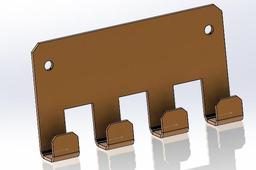
Sheet Metal Design and Press Brake Application in SolidWorks — Training Content
Module 1: Introduction to Sheet Metal Design
Objectives:
Understand the fundamentals of sheet metal parts.
Learn about bend allowances, K-factor, and design constraints.
Familiarize with sheet metal design standards for manufacturing.
Topics Covered:
What is Sheet Metal Design?
Common Manufacturing Methods (Laser Cutting, Press Brake Bending)
Overview of Material Properties
Design Guidelines for Sheet Metal
Module 2: SolidWorks Sheet Metal Tools Overview
Objectives:
Explore SolidWorks sheet metal feature set.
Understand the difference between solid and sheet metal modeling.
Topics Covered:
Sheet Metal Toolbar
Sheet Metal Parameters: Thickness, Bend Radius, K-Factor
Base Flange/Tab, Edge Flange, Hem, Jog, Sketched Bend
Flatten and Unflatten Features
Exercise:
Open a new part.
Enable the Sheet Metal tab.
Use the Base Flange/Tab feature to create a 2mm thick sheet base.
Add Edge Flange to create a simple box shape.
Module 3: Creating a Sheet Metal Part
Objectives:
Create a real-world sheet metal component from scratch.
Understand best practices for designing for bending.
Step-by-Step:
Start with Base Flange/Tab to define the main shape (e.g., rectangular plate).
Add Edge Flanges to form sides (adjust angle and length).
Add Reliefs for bends (Tear, Obround, or Rectangular).
Use Sketched Bend to simulate press brake bends manually.
Apply Corner Treatments (Corner Relief, Corner Trim).
Check Flat Pattern for laser cutting and press brake compatibility.
Module 4: Understanding Bend Calculations
Objectives:
Learn how SolidWorks calculates bend allowances.
Apply correct K-Factor for accurate flat pattern dimensions.
Topics Covered:
Bend Allowance vs. Bend Deduction
K-Factor Explanation (Typical values: 0.3 to 0.5)
How to set custom bend tables in SolidWorks
Controlling bend direction and bend radius
Exercise:
Create a U-shaped bracket.
Calculate the flat length manually and compare with SolidWorks flat pattern.
Modify the K-factor and observe changes.
Module 5: Exporting for Manufacturing
Objectives:
Prepare a design for laser cutting and bending.
Generate flat patterns and technical drawings.
Topics Covered:
Creating 2D Flat Pattern View in Drawings
Adding Bend Notes and Bend Lines
DXF/DWG Export for Laser Cutting
Assigning Bend Directions (Up/Down)
Exercise:
Generate a drawing of your sheet metal part.
Add a Flat Pattern view.
Ann
-
Step 1: sheet metal bending

