

SolidWorks Tutorial: Modeling a Beginner's Practice Part (Exercise 1)

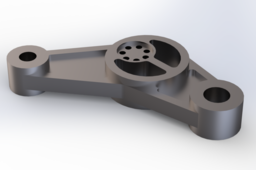
Short description for tutorial list:
A simple, step-by-step SolidWorks tutorial ideal for beginners learning basic sketching, extruding, and cutting features.
.
.
.
Hello CAD enthusiasts! This tutorial guides you through modeling a simple mechanical part in SolidWorks. It’s perfect for beginners learning core functionalities.
Key Skills Covered:
Basic Sketching (lines, circles)
Extrude Boss/Base & Extrude Cut commands
Applying dimensions and constraints
-
Step 1: Sketching the Base
Start a new sketch on the Top Plane. Draw the overall shape of the base plate using lines and circles. Ensure you fully define it with smart dimensions.
-
Step 2: Extruding the Base
Use the 'Extrude Boss/Base' feature to give the base thickness.
-
Step 3: Modeling the Vertical Section
Create a new sketch on the top surface of the base to draw the vertical support. Extrude this sketch upwards.
-
Step 4: Creating the Holes
Use the 'Extrude Cut' command (or Hole Wizard if preferred) to add the necessary through-holes in the model.
-
Step 5: Finalizing the Part
Apply fillets to all sharp edges and assign a material like 'Steel' to complete your model.
Happy modeling! Feel free to ask questions in the comments.

