Learn about the GrabCAD Platform
Get to know GrabCAD as an open software platform for Additive Manufacturing
Visit our new homepage
Home
Control
Shop
Streamline Pro
Partner Program
Print
Community
Log in
Library
Challenges
Groups
Questions
Tutorials
Engineers
Blog
Log in
Dan Hulme
3D graphics programmer and maker
Follow
0
followers
United Kingdom
Tutorials
About
Models
1
Tutorials
1
More
Followers
0
Following
0
Likes
0
Following
0
Followers
0
Likes
0
Tutorials
Sort by:
Most liked
Recent
Most liked
Most viewed
Most commented
Crisp emboss/deboss colors with Stratasys polyjet
Dan Hulme
in
3D Printing
3
0
Beginner
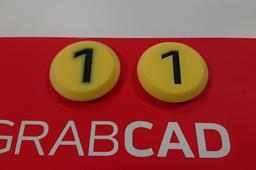
Recently I was printing some board game tokens on our Stratasys J750, and I noticed the colors on my debossed labels looked blurry. At first I thought there was something wrong with the printer, but I soon realised the problem was in my design! I changed my design slightly to get crisp colors. If you've had similar problems with embossed or debossed text or logos, here's how to get them sharp. I've included instructions for Solidworks, but the same idea applies to any CAD tool or mesh editor.
j750
color
labels
emboss
polyjet