Hello Catia Users,
Lately I´ve been working on something in Catia, and I came across the Design table.
And I really liked the idea of synchronizing an Excel table with the parameters in Catia.
Anyway, as I´m updating the excel file the parameters also change in Catia but I have to
always click the update button. My question is: Is there a way to automatically update/refresh the
Geometry in Catia?
I already set the update option in Part-Infrastructure to automatic but it still doesn´t update automatically.
Thanks and Regards
Sebastian
Hi Sébastian,
I use this type of 3d models, one part and an excel file.
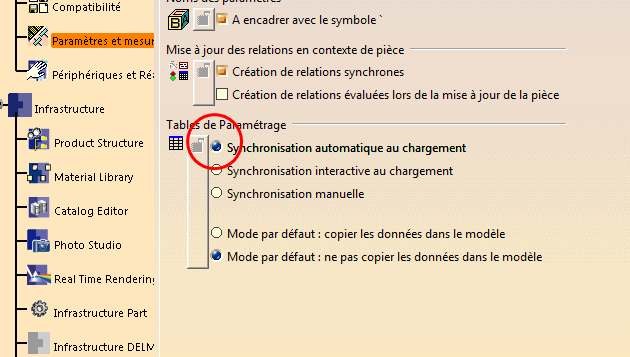
I havent no problem with the update, each time i modifiy the excel file, catia tell me that the excel file as change, and when you close the parameters tab, the 3d is auto update.
Can you send me a pciture of your example?
@+
Sylvain
Hello Sylvain,
Thank you for your reply!
Im not getting any error or anything so of what should i take a picture?
My issue is that even when i close the parameters tab i have to do the update manually. Maybe there´s a issue with my Catia..
Hi Sebastian
I don't understand, the only strange i see, is that the "not history" icon is selected.
why?

I dont understand either why the part is not updating automatically...
And I selected that for another project becuase i needed to build some "dead geometry" :)
I activated all options just like in your pictures but it´s still not happening.
I give up!
Anyway, thank you for taking your time to reply :)
Hello Sylvain, unfortunately i don´t really have time to work on that small project at the moment because of my work.
Anyway the parts were created in a project environment so you won´t be able to open them.
Thank you for your replies.
Sebastian
Hi Sébastian
Can you tell me in wich catia workshop (partdesign, generative shape design, assembly....) you are when this problem happens?
@+
In part design.
Anyway, i stoped working on that project due to time issue.
Hi Sébastian
Ok, if you start again your project, tell me, we will look why it does not work for you.
@+
It's all normal in Catia. I don't know a way to automatically update the model after modifying the excel. Just live with it, Catia is a woman ;-)