Learn about the GrabCAD Platform
Get to know GrabCAD as an open software platform for Additive Manufacturing
Visit our new homepage
Home
Control
Shop
Streamline Pro
Partner Program
Print
Community
Log in
Library
Challenges
Groups
Questions
Tutorials
Engineers
Blog
Log in
John Henderson
Drawing more than conclusions
Follow
0
followers
Calgary, Canada
Tutorials
About
Models
1
Tutorials
1
More
Followers
0
Following
0
Likes
0
Following
0
Followers
0
Likes
0
Tutorials
Sort by:
Recent
Recent
Most liked
Most viewed
Most commented
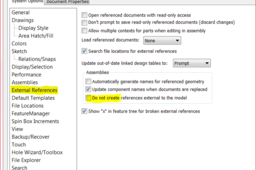
How to solve Reference Problem in SolidWorks "because of the current setting, the reference will be automatically broken"
John Henderson
in
Design & CAD
4
0
Intermediate
Almost every problem in solidworks is fixed with a "hidden" setting :) Make sure the box highlighted below is NOT checked Not sure what it actually means, but you will not get the "because of settings...External...Broken" message. Also, No need to reinstall...(like ever ?) You can go to the delete software area of windows... right click on Solidworks, and select Change. Follow the prompts, and you can run a a repair utility that will sniff for corrupt stuff.
SOLIDWORKS