

Mouse DPI / Vertical Mouse

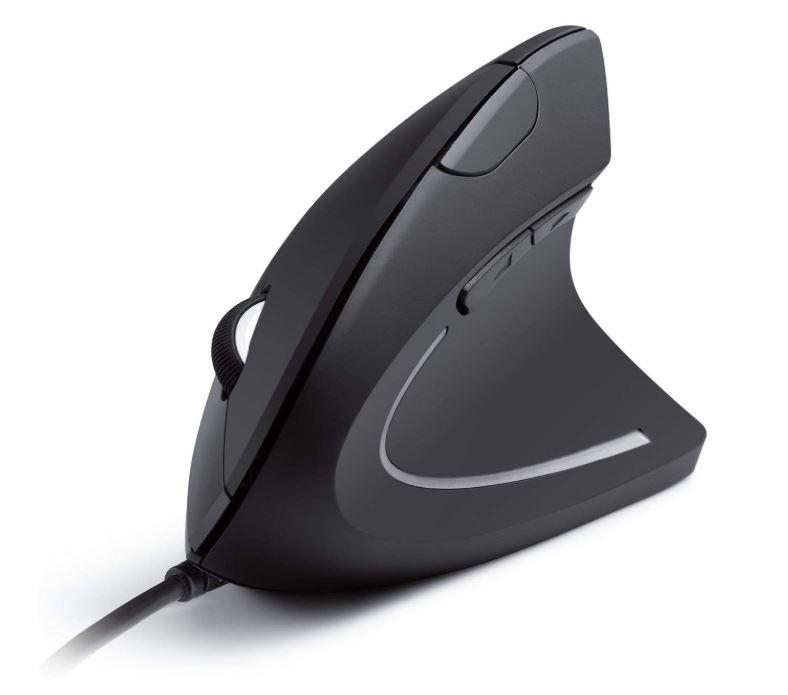
I'm looking for a vertical mouse (ergonomic) to alleviate wrist strain. They range from 600-2000 and most are adjustable, some max out at 1600 DPI. Is this adequate for SolidWorks?
Whats your Mouse DPI? Do you have any trouble selecting what you want?
Also do any of you use a vertical mouse and have you noticed any change with wrist strain?
3 Answers

I use a Logitech M510. It says the max dpi is 1,000. I don't have any trouble selecting items in SW.
Before getting a vertical mouse, it might be worthwhile to insure your chair/desk/workstation/monitor are setup well. My arm was feeling a bit tired at work, and I ended up raising my desk 2-3 inches so my arm/wrist is at a better height.
I'm sure there are several websites dedicated to ergonomics.

It depends how you hold the mouse and how is the setup. My setup that works really well and very comfortable is a chair with armrest (where i rest my elbow) level with the keyborad/mouse table (my office desk has those draw sliders for keyboard/mouse). This makes the whole wrist inline in vertical axis and in horizontal axis as well (as you hold the mouse wherever is comfortable.
The next big improvement is about holding the mouse. I've developed a fond for fingertip grip on mouse and move the mouse with my fingers instead of my whole hand. (thumb and little finger are doing all the work). right pad of your palm (on little finger side) just rests on the mousepad not moving at all.
Here is more about mouse grips http://gaming-mouse.org/how-to-pick-a-gaming-mouse/
My mouse is RAT 5 - excelent 5600 DPI ,
fingertip grip mouse,
horizontal scroll wheel as well as vertical (this horizontal wheel is very nifty. i will never buy another mouse without horizontal wheel),
adjustable dpi (sensitivity) by a button (really useful as i don't chase the mouse on the table. this fingertip grip on the mouse gives for me very precise movement in the span of 35-45mm to any direction on the mat. This dpi button alows me to either hover the screen or just the center portion depending of my workflow.) Either way the mouse can be picked up for more length on the table but here is why the dpi button is useful. to set a value you manage with minimum mouse lifting.
Repeating button - a conveniantly placed button that will repeat at 1ms interval any action you make with the mouse. Perfect for bombing clicks if you need. - not really a CAD feature but it works wonders in some clicker tasks.
2 more buttons on the side that can be mapped to any of your choosing action.
For me it's one of the best, RAT 5 is no longer in production but there is a rat 9 very similar.
For me this the best setup for mouse. I've experienced the dedicated 3dconexions CAD mouse and don't like it that much (the dedicated middle click insted of clicking the wheel is a bit confusing.. i must admit i'm younger that my CAD learning period and old 3button mice on 286, 386, were not overlapped at all)
I have in fact a 3d mouse from 3dconcexions the space pilot pro, but i've found the movement to have loads of inertia and too smooth but imprecise movement. (normal mouse is my preffered method to this day) Anyway, the 3d mouse is not replaceing your normal mouse.
Other palm mouse like logitechs are not my style.
I'm beginning to remeber the old gaming days when the sesitivity was set to max, the mouse was moved 20mm to do a 360 in quake in fingertip or claw grip. Tried both, fingertip is more precise and faster for me at least. Old habits die hard.
Now after some derailment with my story, for you, as far as carpal syndrome studies suggest, moving the wrist and pressing the wrist on the table is not good. There was an article that suggested fingertip grip gamer style described above better for the wrist due to less movement of the whole hand and not pressing on the nerves in the wrist.
Also with this short range of movement, the wire of the mouse will never bother in any way.
I know it's hard to adapt to a new type of holding and moving the mouse but give it a try, you might find something useful.

The one in your picture, by Anker, is the one I use (cordless version). Not sure about DPI but it works fine. I had wrist pain and a click finger going tingly from regular mouse position, figured it was RSI, and switched to a thumb trackball, and vertical mouse.
Was definitely not the ergo factor of my workstation.
I use the vertical mouse 90%+ of the time, but the thumb-trackball comes out for a few days if my hand feels the least bit stressed. It's surprisingly nice to use once one gets used to controlling the pointer. So far so good, several years now of no chronic tingle or pain. Switching things up now and again ended up being what works best for me.
I don't use a regular mouse at all anymore at home and work.

