Learn about the GrabCAD Platform
Get to know GrabCAD as an open software platform for Additive Manufacturing
Visit our new homepage
Home
Control
Shop
Streamline Pro
Partner Program
Print
Community
Log in
Library
Challenges
Groups
Questions
Tutorials
Engineers
Blog
Log in
Sebastijan Prelec
Follow
Hire me
0
followers
Slovenia
Tutorials
About
Models
0
Tutorials
1
More
Followers
0
Following
0
Likes
2
Following
0
Followers
0
Likes
2
Tutorials
Sort by:
Recent
Recent
Most liked
Most viewed
Most commented
how do i hide all planes,constraints in assembly in CATIA ?
Sebastijan Prelec
in
Design & CAD
8
4
Intermediate
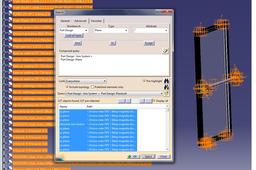
On menu line select EDIT, than on pop-up menu select SEARCH, than go to the tab ADVANCED. On this tab you choose the right parameters: i.e. planes and axis. Selection of more than one parameter must be done with boolean operator "OR". When the parameters are set, then you click SEARCH and after that you click SELECT. Now all desired features are selected and painted in orange (in assembly and in structure tree). Click HIDE command (pop-up menu "view" or icon on toolbar "view") and that's it.
CATIA