

Keyshot for Beginners – 1: Course Content

► EXCERPT:
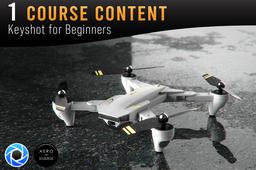
In this beginner’s course for Keyshot, all the things will be taught that are required to produce your own amazing product visualization of your 3D CAD model in Keyshot. In the project phase of the course, you will be taught how to replicate the following image of a drone:
https://aero-3dstudios.com/wp-content/uploads/2022/04/Drone-water-Edit-scaled.jpg
This will include demonstrating all the basics of Keyshot, and also some more advanced bonus techniques.
The following topics will be taught in this course:
1. What ray tracing is
2. A complete overview of the default Keyshot User interface
3. How to properly prepare your model for import to Keyshot, and how to import your model.
4. Setting up your project scene with the model.
5. Assigning materials
6. Applying textures
7. Applying labels
8. Positioning your camera
9. Setting up your lighting environment
10. Lighting settings
11. Applying image styles
12. Creating your render
13. And off course making the final edit of your render in Photoshop
▬▬▬▬▬
And besides that, the following bonus items will be demonstrated:
1. How to make a water puddle effect in Keyshot
2. Fake water droplets on your model
3. Creating a custom ambient occlusion pass
4. And creating custom masks in Keyshot
▬▬▬▬▬
► SUPPORT THE CHANNEL:
Thank you for watching my tutorial. If you would like to support me so I can make more tutorials like this for you, you can do so through any of the options down below:
👉 Subscribe and support the channel: https://bit.ly/aero3dstudios-youtube
👉 Support through Patreon: https://bit.ly/aero3dstudios-patreon
👉 Buy me a coffee: https://bit.ly/aero3dstudios-buymeacoffee
👉 Purchase the Course video's for offline viewing and/or the Project files to be able to work along with the course video's: https://bit.ly/aero3dstudios-gumroad
▬▬▬▬▬
► GET IN TOUCH:
Find my website & portfolio at: https://bit.ly/aero3dstudios
Follow me on Instagram: https://bit.ly/aero3dstudios-instagram
✉ If you would like personal tutoring classes, if you have business inquiries or just general inquiries, you can get in touch with me through: info@aero-3dstudios.com
-
Step 1: Chapter 1: Course Content

