Learn about the GrabCAD Platform
Get to know GrabCAD as an open software platform for Additive Manufacturing
Visit our new homepage
Home
Control
Shop
Streamline Pro
Partner Program
Print
Community
Log in
Library
Challenges
Groups
Questions
Tutorials
Engineers
Blog
Log in
Learn from thousands of free Tutorials.
New user?
Join the community
or
log in.
Tutorials
Most liked all time
Recent
Most liked
Most viewed
Most commented
This week
This month
All time
Category
Design & CAD
Modeling
Drafting
Assemblies
BOM
Dimensioning / Tolerancing
Translations
Manufacturing & CAM
3D Printing
Tooling
NC Machining
Composites
Measurement / Inspection
Simulation & CAE
FEM
CFD
Kinematics
Process Simulation
Engineering Fundamentals
Theory
Process
Standards
Other
Software
Snagit
Alibre Design
ArchiCAD
AutoCAD
AutoCAD Electrical
Autodesk 3ds Max
Autodesk Alias
Autodesk Inventor
Autodesk Maya
Autodesk Revit
Autodesk 123D
BricsCAD
Bentley MicroStation
BlenderCAD
BobCAD-CAM
CATIA
Delmia
DraftSight
FreeCAD
Femap
Fusion 360
Geomagic Design
IronCAD
JT
Kompas-3D
KeyCreator
KeyShot
Lagoa
Luxology
Mastercam
Moi3D
NX Unigraphics
OBJ
Onshape
OpenSCAD
Parasolid
Powermill
Powershape
Pro/Engineer Wildfire
PTC Creo Parametric
PTC Creo Elements
Rhino
SpaceClaim
SOLIDWORKS
solidThinking Evolve
Solid Edge
SolidFace
STEP / IGES
SketchUp
STL
TopSolid
TinkerCAD
T-Flex CAD
TurboCAD
VectorWorks
ViaCAD 3D
VRML / WRL
ZW3D
GrabCAD Print
Rendering
GrabCAD Community
GrabCAD Workbench
Text file
3D Manufacturing Format
Cinema 4D
Other
Skill level
All levels
Beginner
Intermediate
Expert
pet
×
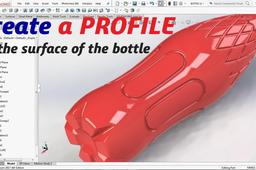
How to Create Profile with Sweep Cut for the BOTTLE 1 Liter
langgeng wahyu hidayat
in
Modeling
3
0
Intermediate
Create a profile on the surface of the bottle using the Sweep Cut command. On shoulder and body. And the grip at the bottom of the bottle. This is the 1-liter capacity
SOLIDWORKS
botol
boss
revolved
cut
sweep
surface
pet
bottle
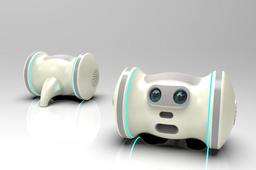
Solidworks Tutorial #94 How to Draw a Pet Robot Design in Solidworks by Solidworks Easy Design
Praveen Kumar
in
Modeling
1
0
Intermediate
We Provide SolidWorks, Auto-CAD,(Mechanical Drawing 3D Design,Catia V5......etc Software Free Tutorials. You can subscribe our channel to get more information. I'm always upload easy way drawing not hard. And unique trick friends. So please Subscribe & Share every Friends.
SOLIDWORKS
keyshot
rendering
solidworks
modeling
robots
robot
pet
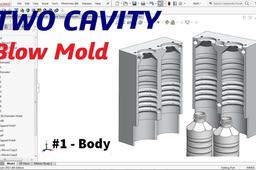
2 Cavity Blow Mold
langgeng wahyu hidayat
in
Modeling
1
0
Intermediate
This blow mold consists of two cavities, The distance between the cavities is 80 mm. This video is the part one. Next I will make the bottom, neck, and cooling. Thanks the viewers who asked for this video tutorial on the two cavity blow mold. Hope it is use full.
SOLIDWORKS
design
pet
bottle
molding
cavity
two
mold
blow
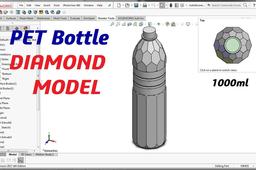
PET Bottle 1000ml with Diamond Model
langgeng wahyu hidayat
in
Modeling
1
0
Beginner
PET Bottle 1000ml with Diamond Model, we can learn for five step: 1. Create revolved boss 2. Extruded cut with polygon sketch profile for three position 3. Fillet command 4. Swept cut for bottom of bottle 5. Thread for neck Number 1-4, can you learn in this tutorial. Than number 5, can you see at https://grabcad.com/tutorials/draw-cosmetic-bottle-in-solidworks
SOLIDWORKS
boss
revolved
water
mineral
surface
pet
bottle
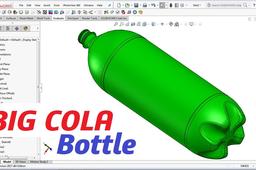
Create the Unique BIG COLA Bottle
langgeng wahyu hidayat
in
Modeling
0
0
Beginner
Hi guys, I hope you like to watch this video tutorial. Create the unique big cola bottle 3.1L. In this tutorial, you will learn about: - Revolved Boss - Helix command for Thread bottle - Swept Boss command for bottom bottle - Circular Pattern command Thank you #SolidworksTutorial #BigColaBottle
SOLIDWORKS
pet
bottle
cola
big
PET preform and uses
ARUN SOCRATIS J
in
Other
0
0
Intermediate
A **plastic PET preform** is a small, test-tube-shaped piece of polyethylene terephthalate (PET) that serves as the **intermediate product** in manufacturing PET bottles and containers.
prefom to bottle
pco
neckfinish
plastic
preform
pet
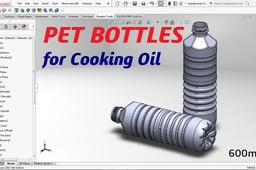
PET BOTTLE for Cooking Oil
langgeng wahyu hidayat
in
Modeling
0
1
Intermediate
PET BOTTLE for Cooking Oil quantity 600ml there are: - Diamond model on shoulder - Thread three side - Groove on body - and Grip at the bottom Use the main command as: - Sweep Boss - Revolved Boss - Extruded Cut - Revolved Cut - Sweep Cut - Circular Pattern - Linear Pattern
SOLIDWORKS
thread
plastic
pet
plastik
revolved
botol
bottle