Learn about the GrabCAD Platform
Get to know GrabCAD as an open software platform for Additive Manufacturing
Visit our new homepage
Home
Control
Shop
Streamline Pro
Partner Program
Print
Community
Log in
Library
Challenges
Groups
Questions
Tutorials
Engineers
Blog
Log in
Learn from thousands of free Tutorials.
New user?
Join the community
or
log in.
Tutorials
Most liked all time
Recent
Most liked
Most viewed
Most commented
This week
This month
All time
Category
Design & CAD
Modeling
Drafting
Assemblies
BOM
Dimensioning / Tolerancing
Translations
Manufacturing & CAM
3D Printing
Tooling
NC Machining
Composites
Measurement / Inspection
Simulation & CAE
FEM
CFD
Kinematics
Process Simulation
Engineering Fundamentals
Theory
Process
Standards
Other
Software
Snagit
Alibre Design
ArchiCAD
AutoCAD
AutoCAD Electrical
Autodesk 3ds Max
Autodesk Alias
Autodesk Inventor
Autodesk Maya
Autodesk Revit
Autodesk 123D
BricsCAD
Bentley MicroStation
BlenderCAD
BobCAD-CAM
CATIA
Delmia
DraftSight
FreeCAD
Femap
Fusion 360
Geomagic Design
IronCAD
JT
Kompas-3D
KeyCreator
KeyShot
Lagoa
Luxology
Mastercam
Moi3D
NX Unigraphics
OBJ
Onshape
OpenSCAD
Parasolid
Powermill
Powershape
Pro/Engineer Wildfire
PTC Creo Parametric
PTC Creo Elements
Rhino
SpaceClaim
SOLIDWORKS
solidThinking Evolve
Solid Edge
SolidFace
STEP / IGES
SketchUp
STL
TopSolid
TinkerCAD
T-Flex CAD
TurboCAD
VectorWorks
ViaCAD 3D
VRML / WRL
ZW3D
GrabCAD Print
Rendering
GrabCAD Community
GrabCAD Workbench
Text file
3D Manufacturing Format
Cinema 4D
Other
Skill level
All levels
Beginner
Intermediate
Expert
sliding
×
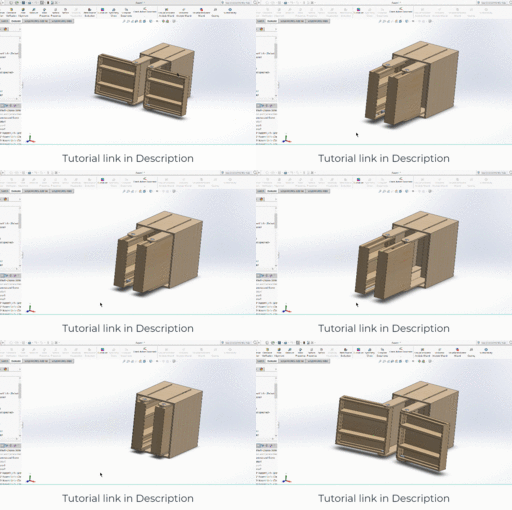
Project | Vertical Drawer Mechanism Wood Working in Solidworks
Amit Mourya
in
Assemblies
14
1
Beginner
Our facebook Page : https://www.facebook.com/EngineeringExplanation Our website : www.engineerknow.com FREE COURSE LINK SOLIDWORKS BEGINNER TO ADVANCE : https://youtu.be/iYYHmvnlSQo Solidworks animation and motion analysis course for beginners udemy course link : https://www.udemy.com/course/solidworks-animation-and-motion-analysis/?referralCode=8F40E7F83856CFF0C5FE [if you need discount coupon message me on my facebook page] our new Youtube channel : Engineerknow : [ for understanding how the machine works and other engineering thing] https://www.youtube.com/channel/UCU5LqyPgX7E8ri4G8ag9xZQ Mechanical Coder : [Coding in Python for mechanical engineers] https://www.youtube.com/channel/UC__7TWjURc7KnChqoQrAYoQ for INDIAN ONLY : https://www.youtube.com/channel/UCDws0ifI1mdQHgJWUSBzrOA
SOLIDWORKS
shelf
sliding
ikea
drawer
vertical
analysis
motion
animation
project
working
wood
tutorial
solidworks
How to FDM Print for Part Sliding Clearance
GrabCAD Tutorials
in
Assemblies
13
4
Intermediate
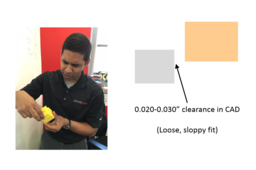
If you are 3D printing parts that have to fit/slide together after printing, you will need to put some sort of clearance between those parts in your CAD system. A good starting place is a clearance 2x the layer height you are going to print at, but you should make a few smaller test prints at different clearances to see if the 2x layer height rule holds for your particular situation and orientation. Have fun and happy printing!
GrabCAD Print
sliding
clearance
printing
3d
fdm
Intro to Dynamic Simulation CATIA 3DX [Part 1]
Maxime Chagnot
in
Assemblies
4
0
Beginner
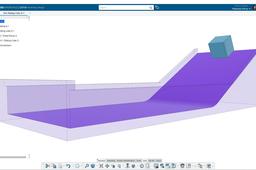
Hello 3DExperience Fans :) I took a 3-month break from YouTube to get fresh new ideas and now I am back to provide you new videos and tutorial for 3DExperience! Today's video is an introduction to Dynamic Simulation on CATIA 3DExperience R2020x. In first part we will talk about friction coefficient in contacts. First you will learn how to create a mechanism, add weight and create contacts between component. Then you will create a dynamic scenario in Mechanical Systems Experience. You will be able to create a gravity excitation and compute the dynamic simulation. The case of the simulation is a cube sliding on a ramp. You can play with the angle of the ramp and the friction coefficient to obtain different results in the dynamic simulation. Enjoy and remember to stay home! Hope this video will be helpful for you to learn more about 3DExperience :D Find the model on this GrabCad link Please Like, Comment, Share and Subscribe ;)
CATIA
video
contacts
friction
ramp
sliding
gravity
simulation
dynamic
Tutorial : Creating Sliding Curve Motion in CATIA
Rahul
in
Design & CAD
0
0
Intermediate
Follow the steps to achieve slide curve motion.
CATIA
motion
v5
catia
sliding
digital
curve
dmu
kinematics
up
mock
JP_005_GrabCAD Print: 部品摺動部の隙間をFDM造形する方法
Stratasys Japan
in
Assemblies
0
0
Intermediate
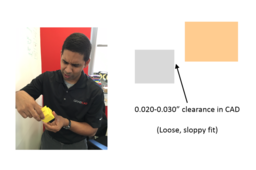
造形後にはめ合わせるまたは摺動(スライド)させる必要がある部品を3D造形する場合、CADシステムで該当する部品の間にある程度の隙間を設ける必要があります。目安として、造形する際の積層ピッチの2倍の隙間から始めるとよいでしょう。ただし、小さいサイズで何度かテスト造形を行い、積層ピッチの2倍の法則が特定の状況や向きに当てはまるかを確認することをお勧めします。それでは3Dプリンタで楽しくモノづくりをしていきましょう!
GrabCAD Print
fdm
3d
printing
clearance
sliding