Ask and answer questions and download tutorials

Thousands of tutorials to learn from

Feed

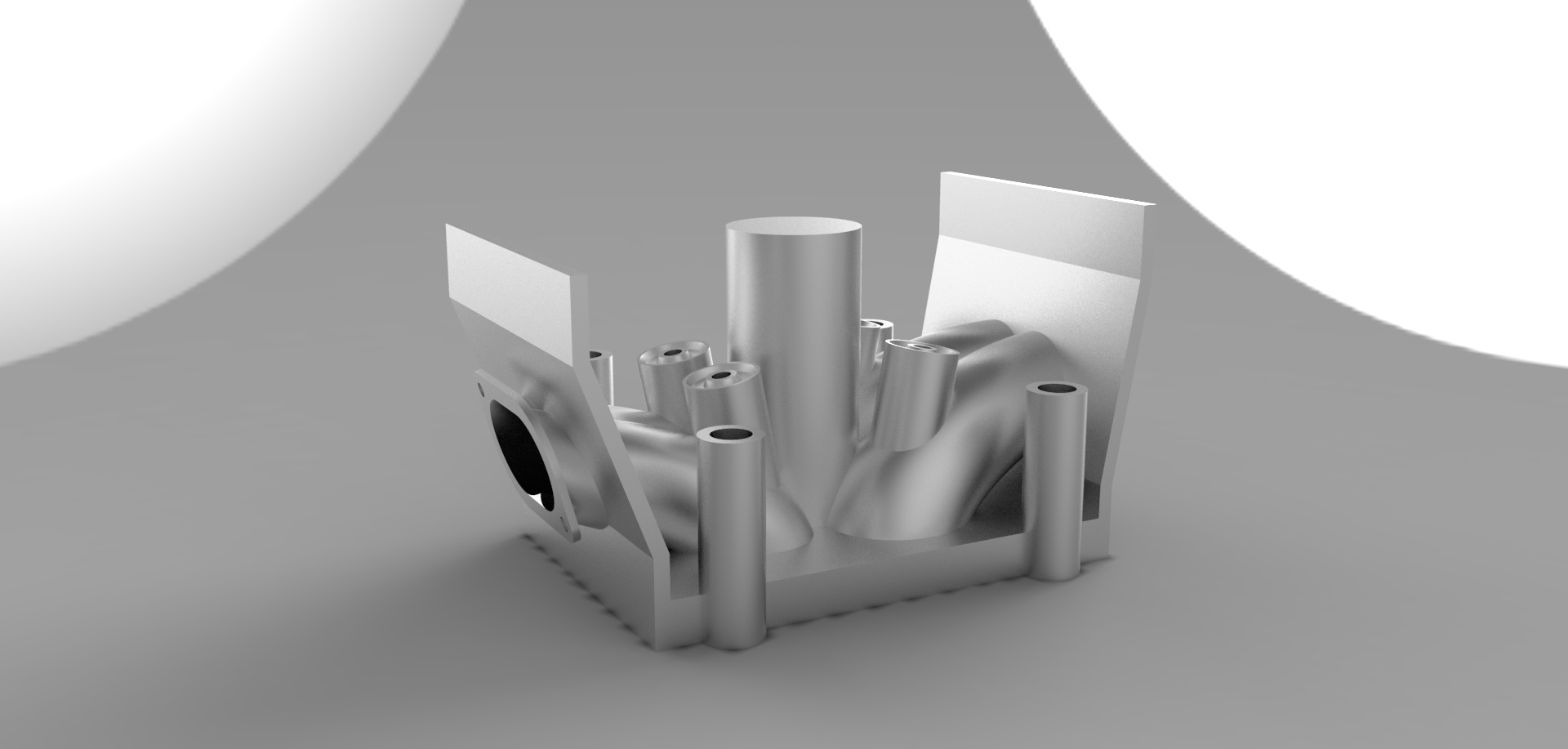
Tutorial: How to make engine part 32

By Aykut Dana on 30 Aug 23:44 9 answers 4784 views 6 comments

CYLINDER HEADS

Intake and exhaust vent

9 answers

  • Aykut Dana
    Aykut Dana 9 months ago

    CYLINDER HEADS

    1. Step 1

      open a sketch on the shown surface

      Medium

    2. Step 2

      draw two circles

      Medium

    3. Step 3

      add shown line. it must be tangent with the circle that on the left and it must be coincident with the on the right circles top point.

      Medium

    4. Step 4

      add this line

      Medium

    5. Step 5

      add shown lines like before ones

      Medium

    6. Step 6

      use trim command

      Medium

    7. Step 7

      use skecth fillet command

      Medium

    8. Step 8

      add two circles

      Medium

    9. Step 9

      extrude it by 2 mm

      Medium

    10. Step 10

      we will make same things for this side. open a sketch and draw two 18mm radiused circles

      Medium

    11. Step 11

      insert these lines

      Medium

    12. Step 12

      use trim command..

      Medium

    13. Step 13

      use sketch fillet command then draw two circle like before.

      Medium

    14. Step 14

      extrude it by 2mm

      Medium

    15. Step 15

      now we will use cut-loft command. be sure that these sketches are shown

      Medium

    16. Step 16

      open cut-loft command and select the smaller circles for profiles

      Medium

    17. Step 17

      select the centerline

      Medium

    18. Step 18

      use cut_loft command on the other side.

      Medium

    19. Step 19

      make the guide lines parallel with the each other. if you don't do that, your cut-loft shapes will be irregular

      Medium

    20. Step 20

      select the centerline and confirm that

      Medium

    21. Step 21

      use right plane and mirror the cut-lofts

      Medium

    22. Step 22

      open a sketch on the shown face

      Medium

    23. Step 23

      draw two circles

      Medium

    24. Step 24

      add shown lines

      Medium

    25. Step 25

      use trim command

      Medium

    26. Step 26

      use cut-extrude command with shown values

      Medium

    27. Step 27

      make same things for the other side. you should use convert entities command and select shown edges

      Medium

    28. Step 28

      cut the body like shown

      next: http://grabcad.com/questions/tutorial-how-to-make-engine-part-33

      Medium

  • hoang
    hoang 9 months ago

    Wow. Thanks for share.

  • Danijel Djurica
    Danijel Djurica 8 months ago

    I thing that is more easyer to record a desktop in .avi or .mp4 format, I think that is better then this.

  • Leo Kiviluoma
    Leo Kiviluoma 8 months ago

    Everything fine to step 21.

    I have two beautiful cut-lofts. But I can not feature mirror them. I really don't understand. Preview of mirror is fine.

    But hitting ok -> Rebuild Errors: The selected features could not be patterned using geometry pattern.

    - Uncheck does not help -

    ? Leo

    Attachments

    CylinderHead.SLDPRT, 989 KB
    Download
  • Brylle
    Brylle 8 months ago

    Is part 32 the final part of this tutorial? where is the assembly of the created parts?

  • Jurriën Scheffer
    Jurriën Scheffer 8 months ago

    There are a lot of under defined sketches.....
    That's a BIG SolidWorks no no!

  • Aykut Dana
    Aykut Dana 8 months ago

    I have a problem with my internet in these days, I will answer all of your questions soon
    I generated new tutorials, they will be published after a few days.

Add your answer to: "Tutorial: How to make engine part 32"

Save Cancel