Learn about the GrabCAD Platform
Get to know GrabCAD as an open software platform for Additive Manufacturing
Visit our new homepage
Home
Control
Shop
Streamline Pro
Partner Program
Print
Community
Log in
Library
Challenges
Groups
Questions
Tutorials
Engineers
Blog
Log in
James
Follow
0
followers
Germany
Tutorials
About
Models
0
Tutorials
1
More
Followers
0
Following
0
Likes
0
Following
0
Followers
0
Likes
0
Tutorials
Sort by:
Recent
Recent
Most liked
Most viewed
Most commented
How to create a mechanism with more than two gears in CATIA
James
in
Design & CAD
0
2
Beginner
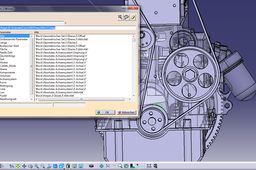
Thanks for the reply. Will this solution work also for stationary rotating gears though? In the end I found a way of doing it that seems to work ok. I didn't use the gear connection funtion between the gears but instead left the axial rotation of all the connected gears as independant variables. These can then be related to one another at the end by creating a relationship of the commanding variables. I'm using Catia in German so I don't know exactly how the commands are called in the English version but in the mechanism under Befehle (so "commands" I guess) double click to view the properties and then use Verknüpfungen (Relationships would be the English translation I guess). This requires a sketch of a line that is in the same plane as the face of the gears and causes all gears to rotate with the same angular velocity. You can edit the velocity for each individual gear however by editing the function (the fx button) in the window as you create the Verknupfung. Hopefully this is clearer in the little tutorial I've put below
CATIA
mechanism
gears
catia
multiple