Learn about the GrabCAD Platform
Get to know GrabCAD as an open software platform for Additive Manufacturing
Visit our new homepage
Home
Control
Shop
Streamline Pro
Partner Program
Print
Community
로그인
Library
Challenges
Groups
Questions
Tutorials
Engineers
Blog
로그인
Pablo Sánchez
CAD/CAE/CAM
Follow
28
followers
Spain
Tutorials
About
Models
2
Tutorials
2
More
Followers
28
Following
22
Likes
33
Following
22
Followers
28
Likes
33
Tutorials
Sort by:
Most liked
Recent
Most liked
Most viewed
Most commented
How to create a linked BOM and balloons in a CATIA drawing
Pablo Sánchez
in
BOM
9
0
Intermediate
We can do an assembly drawing with a Bill of Material explaining to the manufacturer important info about each part. Also, we can number the parts with balloons, so that it can be easy to find and identify them. It will be explained all the necessary steps in Assembly Design and Drafting module.
CATIA
design
assembly
catia
material
bill
bom
balloon
drafting
Linking parts in CATIA: Publication
Pablo Sánchez
in
Modeling
3
1
Expert
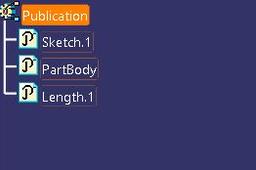
We can have the same sketch (or parameter, geometry, body,etc) in different parts of the same assembly, that way if we need to change this element, we only need to do it in one place. Some examples: 1) Diameter of holes, lengths. 2) We maybe want a reference model with all the sketches, and then copy those sketches to different parts. 3) We could have a solid of revolution, that we need to split due to the chosen manufacturing process. And after the split, maybe because of minor features (holes, etc) are not totally simmetric, so we have to define two parts with two drawings. We could be faster if we linked only the common solid, before applying specific features. In all of those cases we can use the powerful tool in Catia known as Publication.
CATIA
revolution
solid
publication