

Best mouse for CATIA?

I mostly use CATIA and just can't stand pressing the middle button/wheel. In CATIA, the middle button is used for pan AND rotate (in combination with the left button). So I basically have to press the middle button (which is also a scroll wheel) every 2 seconds and it is really a pain, to the point that my middle finger hurts after a few hours. I have two mice, both Logitech, an M510 and an M720. They work great for everything, except CATIA.
Does anyone know if there is some sort of configuration in CATIA or Logitech Options to somehow change this? The BIG advantage of the "CATIA" method is that you do not need to touch the keyboard at all to move in 3D (no ctrl or shift button to hold) and I kind of like it this way.
Otherwise, I would probably go for a three-button (no wheel) mouse that also has the "wheel" function on it somehow. Like a some sort of sensor inside the middle button that can tell if I'm scrolling with my finger.
Anyone has experience with a good mouse for CATIA?
P.S. I know about the second 3D mouse that you can add for your left hand, but I'm not really into this.
3 Answers

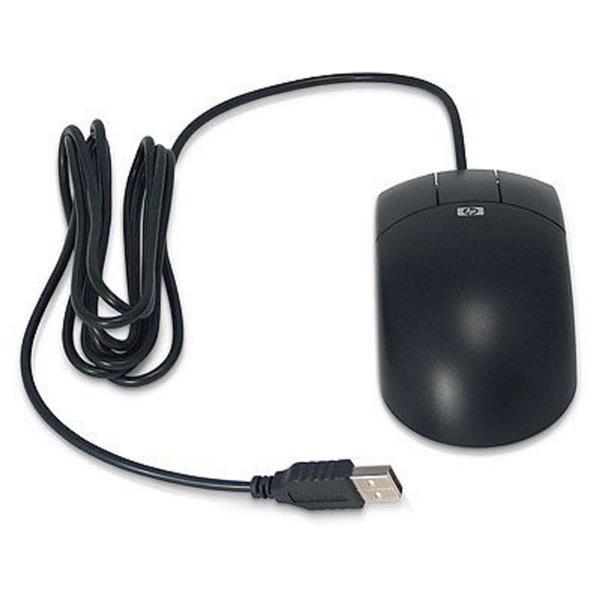
I've never liked using a scroll wheel mouse with CATIA either. Not sure this is the best, but I use an old 3-button optical mouse. HP DY651A.
I don't have one, but a Space Navigator works well to zoom and rotate with CATIA.
As for for using your existing mouse, you can rebind middle mouse click to a key on keyboard. Or you could remap a key to hold both middle mouse button and the right click. So in CATIA you could just pres and hold that key and move the mouse for 3drotate. Autohotkey is a nifty tool.
https://www.youtube.com/watch?v=aki5NN9K6Fs
Personally never bothered with autohotkey, because i use a gaming mouse (with its software) a mechanical gaming keyboard (with hardware and software macro binding) In my software i can bind to a key a whole program.. to click and release stuff to launch programs, even time delayed stuff (like click and hold middle mouse button and click and release right button to simulate zoom command in CATIA)
There is CadMouse from 3dconexions https://www.3dconnexion.eu/products/cadmouse.html/?source=box with deidcated middle click and a normal scroll
Looks nice, i've held one and disliked the grip type, but you may like it.
Many gaming mice have wide scroll wheels. Also have more extra buttons, macro software, extra DPI, and various other features.
I use RAT 7, RAT5, and dragonwar phantom mice. Gaming mice with extra wide scroll wheel and lots of features at a fraction of the cost of that CadMouse (that i find very expensive for just a mouse)
http://www.dragonwar.eu/product-detail.php?id=14
https://www.madcatz.com/index.php?action=proA-rat6
If you like to tinker with programming for macro stuff, it's advisable to have a look at gaming gear with macro functions. I love them and keyboard is asus strix tactic pro with 10 dedicated macro keys (like a mininumpad on the left side with buttons m1 to m10) and it has hardware macro (that is the macro functions is stored in the keyboard chip and not in windows software. theese hardware macros work anywhere, even in BIOS) . Also the mouse i use have hardware repeater button. I hold pressed on the side of the mouse and any click i make with the mouse is repeated at 2ms intervals (autoclicker but hardware.. will autoclick even in bios).
For macro stuff the software versions can be more advanced but it's software.. so if you change computers or disconnect the mouse or the software is not running etc.. that macro function will not work. But on hardware macro, there is an eeprom chip inside the mouse/keyboard and the software used to create the macro will then update the firmware of the mouse/keyboard writing your macro asignment in it. A nifty tool if you like to automate certain stuff.
In catia for a certain project, a feature was repeated a lot.. so i've mapped a key to run a VBA script for catia to insert a powercopy at that location.

I like logitech find G502 Proteus very good and i use it 8 to 10 hours daily. I tried G903 not really sure why but in the end still G502 was a better option for me at work and at home. MX performance 2S is good for day by day used. I own an 3DConnexion mouse but is easier and faster to use the scroll. Mostly 3DConnection i used it in 3Ds Max or when i create animation in 3Ds max or others softwares when i do 3D modeling or simulation G502 is the best for me.

