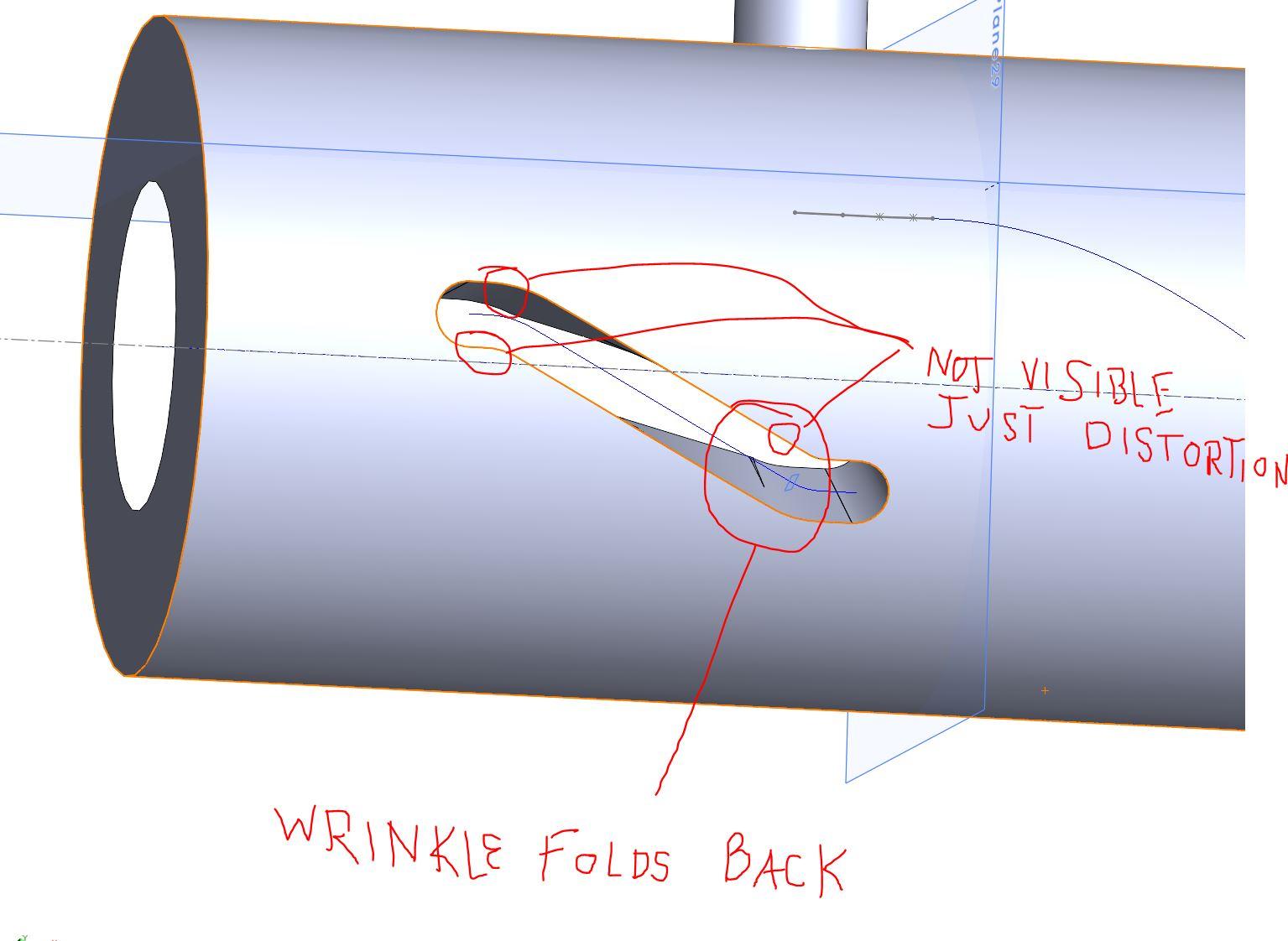
sweep cut with solid body

I want to cut a helical curve with a short straight path on each end of the helix.
it appears to work when using smaller diameter solid body. When I incrementally make the tool body larger I start to see wrinkles at the transition to and from the helix until it blows up and wont even do the sweep cut.
the work around I have found for this is a slot cut on each end of the helix, but there has to be a way to do this all in one feature operation.
I wish to mate to the sweep path with another part in an assembly and allow for the mated part to rotate as it follows the path. When breaking the feature up into three steps, I loose the ability to mate to the sweep.
In the model attached, the tool diameter is small, I wish t to be 8mm in diameter, that certainly blows up for me. In other attempts in the same model, the three step approach kind of does what I want but it is not usable in the assembly.
I have found some info on utube, but I have not found what I'm trying to do.
Accepted answer

I believe that I understand what you are trying to accomplish and I would do it differently by avoiding the 'cut with solid body' which is a bit unpredictable. Please look at the attached Solidworks 2014 file:
1 Other answer
PARDON MY SLOPY PENMANSHIP, i WAS NEVER GOOD AT WRITING WITH A MOUSE.
IN THE IMAGE, THE FOLD IS QUITE VISIBLE IF YOU ZOOM IN. THE OTHER AREAS ARE JUST WRINCKLES, BUT IF YOU INCREASE THE SIZE OF THE TOOL THEY BECOME MORE PRONOUNCED.
I SAW A UTUBE VID THAT DOES WHAT I NEED TO DO EXCEPT THE TOOL WAS A ROUND END AS IF REPRESENTING A BALL END MILL CUTTER. AND NOT GOING DEEPER THAN THE DIAMETER OF THE BALL END.
THANK YOU FOR YOUR TIME IN THIS MATTER