Learn about the GrabCAD Platform
Get to know GrabCAD as an open software platform for Additive Manufacturing
Visit our new homepage
Home
Control
Shop
Streamline Pro
Partner Program
Print
Community
Log in
Library
Challenges
Groups
Questions
Tutorials
Engineers
Blog
Log in
taufikm.tm
Design Engineer
Follow
Hire me
747
followers
jakarta, Indonesia
Tutorials
About
Models
61
Tutorials
1
More
Followers
747
Following
94
Likes
552
Following
94
Followers
747
Likes
552
Tutorials
Sort by:
Recent
Recent
Most liked
Most viewed
Most commented
POLY BEAMS AUTOCAD ADVANCE STEEL
taufikm.tm
in
Modeling
2
0
Beginner
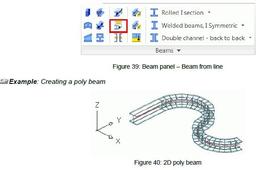
A poly beam is a beam sequence (straight beams, curved beams or a combination of the two) created as a sin-gle object. Any section class can be created as poly beam. To create poly beams, a polyline must be created. Any 2D or 3D polyline can be converted to a poly beam. The position of the beam is independent of the coordinate system since the beam position is determined by the position of the polyline. There are two ways to draw a poly beam: • Directly in the model by specifying the points (point by point). The beam is drawn in the X/Y plane of the coordinate system • By selecting a polyline. Any 2D or 3D polyline can be converted into a poly beam. In this case the beam position is independent from the coordinate system since the beam position is determined by the position of the polyline. Additionally, any line or arc can be converted to a beam using the Beam from line tool.
AutoCAD
advance
structure
steel