Learn about the GrabCAD Platform
Get to know GrabCAD as an open software platform for Additive Manufacturing
Visit our new homepage
Home
Control
Shop
Streamline Pro
Partner Program
Print
Community
Log in
Library
Challenges
Groups
Questions
Tutorials
Engineers
Blog
Log in
Learn from thousands of free Tutorials.
New user?
Join the community
or
log in.
Tutorials
Most liked all time
Recent
Most liked
Most viewed
Most commented
This week
This month
All time
Category
Design & CAD
Modeling
Drafting
Assemblies
BOM
Dimensioning / Tolerancing
Translations
Manufacturing & CAM
3D Printing
Tooling
NC Machining
Composites
Measurement / Inspection
Simulation & CAE
FEM
CFD
Kinematics
Process Simulation
Engineering Fundamentals
Theory
Process
Standards
Other
Software
Snagit
Alibre Design
ArchiCAD
AutoCAD
AutoCAD Electrical
Autodesk 3ds Max
Autodesk Alias
Autodesk Inventor
Autodesk Maya
Autodesk Revit
Autodesk 123D
BricsCAD
Bentley MicroStation
BlenderCAD
BobCAD-CAM
CATIA
Delmia
DraftSight
FreeCAD
Femap
Fusion 360
Geomagic Design
IronCAD
JT
Kompas-3D
KeyCreator
KeyShot
Lagoa
Luxology
Mastercam
Moi3D
NX Unigraphics
OBJ
Onshape
OpenSCAD
Parasolid
Powermill
Powershape
Pro/Engineer Wildfire
PTC Creo Parametric
PTC Creo Elements
Rhino
SpaceClaim
SOLIDWORKS
solidThinking Evolve
Solid Edge
SolidFace
STEP / IGES
SketchUp
STL
TopSolid
TinkerCAD
T-Flex CAD
TurboCAD
VectorWorks
ViaCAD 3D
VRML / WRL
ZW3D
GrabCAD Print
Rendering
GrabCAD Community
GrabCAD Workbench
Text file
3D Manufacturing Format
Cinema 4D
Other
Skill level
All levels
Beginner
Intermediate
Expert
CATIA
×
DraftSight
×
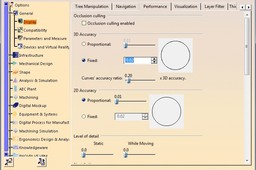
why circles of small of diameter looks like polygon in catia v5?
Kris
in
Design & CAD
11
1
Intermediate
This is a visualization problem. Change the following settings, see images.
CATIA
CATIA V5 Wireframe & Surface Design
DHANASEKAR VINAYAGAMOORTHY
in
Modeling
11
0
Intermediate
This Tutorial contains videos for wireframe and surface design with examples.. Actually this is our internal Webinar click here for more videos https://grabcad.com/tutorials/catia-v5-generative-sheetmetal-design
CATIA
shape
modelling
design
surface
wireframe
Learn Catia V5- Water Mug or Cup | Generative Shape Design
Muthiah R
in
Modeling
11
2
Beginner
Catia Tutorial- Generative Shape Design for Beginners.
CATIA
catia
design
surface
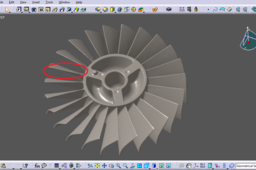
How to change the blades on a 'dumb solid' (CATIA)
Jack K
in
Modeling
10
1
Intermediate
This tutorial is to provide a guide for modifying a CATIA file containing a "dumb" solid. (The reader should be familiar with basic CATIA Part Design commands) This tutorial is to respond to a recent question asked by Nouman Khalid: "This dump solid is generated from a STL and i am given a .STP file. I want all the blades to be similar to generate a reference model for modal analysis. I want the encircled blade to be copied all over rotor. Please guide how this can be done."
CATIA
modify
step
solid
dumb
catia
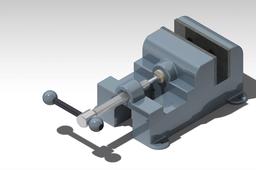
CATIA V5 Tutorial - Assembly design and DMU Kinematics
Martial Yomba
in
Design & CAD
10
1
Beginner
CATIA V5 Tutorial - Mechanical bench vise https://www.youtube.com/watch?v=9l8ynZA3iJo
CATIA
v5
catia
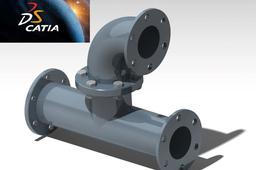
how to create Pipe Fitting with CATIA V5
Martial Yomba
in
Design & CAD
10
2
Beginner
https://youtu.be/aCdcbnPWzYU
CATIA
modeling
v5
catia
3d
Catia Tutorial Part Design Examples
MeC
in
Modeling
10
3
Beginner
Catia V5 Part Design Examples for Beginners
CATIA
design
part
examples
beginners
tutorial
catia
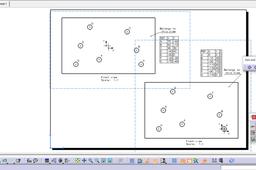
How to change origin of view in Catia drafting?
özgür kesebir
in
Drafting
9
2
Intermediate
How to change origin of view in Catia drafting? It will show you how to change origin and axis lines in drawing.
CATIA
drafting
origin
v5r19
catia
CATIA V5 Generative Sheetmetal Design
DHANASEKAR VINAYAGAMOORTHY
in
Modeling
9
1
Intermediate
This Tutorial Contains CATIA v5 Sheetmetal design videos for getting started with sheetmetal design
CATIA
tutorial
v5
catia
design
generative
sheetmetal
Twin Engine : Just for Practice
Avnish Kumar (अवनीश कुमार )
in
Modeling
9
1
Expert
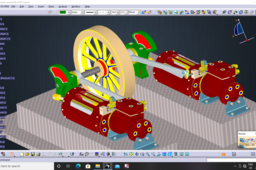
The first V6 prototype engine was produced in 1906, however it took until 1950 for the first automotive V6 engine to reach production. In the past 20 to 30 years, the V6 layout has become the most common layout for six-cylinder automotive engines
CATIA
v6
ansys
solidwork
catia
How to create a linked BOM and balloons in a CATIA drawing
Pablo Sánchez
in
BOM
9
0
Intermediate
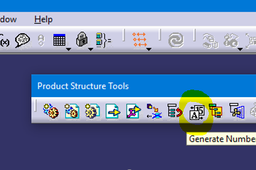
We can do an assembly drawing with a Bill of Material explaining to the manufacturer important info about each part. Also, we can number the parts with balloons, so that it can be easy to find and identify them. It will be explained all the necessary steps in Assembly Design and Drafting module.
CATIA
design
assembly
catia
material
bill
bom
balloon
drafting
Car roof components design and analysis
Nishanth kumar
in
Modeling
9
1
Intermediate
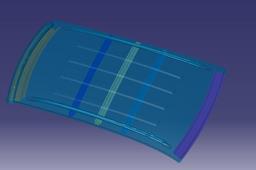
To achieve an efficient and well-engineered car roof design, various critical considerations are taken into account. This article explores the aim and objectives of designing and developing a car roof, along with essential factors such as visibility, heat distortion, snow load criteria, and draft analysis. Additionally, the role of roof components, like the front and rear roof rails, reinforcement center, and bow roofs, is examined in enhancing the overall strength and performance of the car's roof. By meticulously analyzing these design parameters, engineers and designers can create a robust and aesthetically appealing car roof that meets stringent safety standards and fulfills customer expectations.
CATIA
sunroof
carroofdesign
vehiclesafety
roofcomponents
automotiveengineering
draftanalysis
roofdesign
car
how to design a honey comb structure in catia
Atheeq Saqlain
in
Modeling
9
0
Beginner
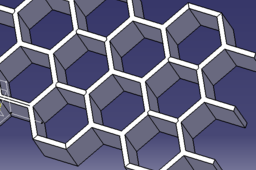
this tutorial is about designing a honey comb structure in catia v5. it uses surfacing technique and making patterns of the structure. this is one of the easiest way to design a honey comb structure
CATIA
surfacing
pattern
easy
design
cool
modeling
catia
comb
honey
[VIDEO] Topology Optimization on a Bracket
Maxime Chagnot
in
Modeling
9
3
Beginner
Hello Everyone, This new video is an introduction to Topology Optimization on the 3DExperience Release 19x. Functional Generative Design application brings the best of CATIA (design) and SIMULIA (topology optimization) in order for you to create light and robust parts. This video will show you the entire topology optimization process on a aluminium bracket that can handle 500N (50kg). You will see how to create a design space and add the functional regions. Then you will create a mesh, add loads and constraints and run a structural simulation. After that you will setup the topology optimization parameters and run the job. The result will be a lighter version of the part. you can run another simulation to validate the result. The organic geometry will be automatically generated. This result can be used for 3D Printed. However if you do not have a 3D Printer, it is also possible to generate a prismatic solid based on machining rules. Hope you will enjoy this video! Find the 3D Model on this GrabCad link: https://grabcad.com/library/topology-optimization-brackets-1 Please Like, Comment, Share and Subscribe :D
CATIA
manufacturing
reduction
weight
3dexperience
optimization
topology
simulia
catia
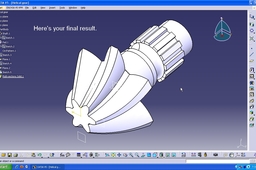
Tutorial:Modeling a helical gear in Catia V5.
Abhijeet
in
Design & CAD
9
1
Beginner
Tutorial: Modeling a helical gear in Catia V5
CATIA
gear
helical
tutorial
1
…
5
6
7
…
77