Learn about the GrabCAD Platform
Get to know GrabCAD as an open software platform for Additive Manufacturing
Visit our new homepage
Home
Control
Shop
Streamline Pro
Partner Program
Print
Community
Accedi
Library
Challenges
Groups
Questions
Tutorials
Engineers
Blog
Accedi
Learn from thousands of free Tutorials.
New user?
Join the community
or
log in.
Tutorials
Most liked all time
Recent
Most liked
Most viewed
Most commented
This week
This month
All time
Category
Design & CAD
Modeling
Drafting
Assemblies
BOM
Dimensioning / Tolerancing
Translations
Manufacturing & CAM
3D Printing
Tooling
NC Machining
Composites
Measurement / Inspection
Simulation & CAE
FEM
CFD
Kinematics
Process Simulation
Engineering Fundamentals
Theory
Process
Standards
Other
Software
Snagit
Alibre Design
ArchiCAD
AutoCAD
AutoCAD Electrical
Autodesk 3ds Max
Autodesk Alias
Autodesk Inventor
Autodesk Maya
Autodesk Revit
Autodesk 123D
BricsCAD
Bentley MicroStation
BlenderCAD
BobCAD-CAM
CATIA
Delmia
DraftSight
FreeCAD
Femap
Fusion 360
Geomagic Design
IronCAD
JT
Kompas-3D
KeyCreator
KeyShot
Lagoa
Luxology
Mastercam
Moi3D
NX Unigraphics
OBJ
Onshape
OpenSCAD
Parasolid
Powermill
Powershape
Pro/Engineer Wildfire
PTC Creo Parametric
PTC Creo Elements
Rhino
SpaceClaim
SOLIDWORKS
solidThinking Evolve
Solid Edge
SolidFace
STEP / IGES
SketchUp
STL
TopSolid
TinkerCAD
T-Flex CAD
TurboCAD
VectorWorks
ViaCAD 3D
VRML / WRL
ZW3D
GrabCAD Print
Rendering
GrabCAD Community
GrabCAD Workbench
Text file
3D Manufacturing Format
Cinema 4D
Other
Skill level
All levels
Beginner
Intermediate
Expert
abkant
×
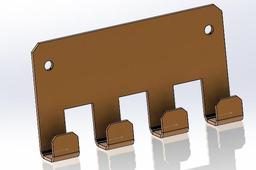
Solidworks sheet metal sketch bend
ergunay77
in
Modeling
1
0
Intermediate
Sheet Metal Design and Press Brake Application in SolidWorks — Training Content Module 1: Introduction to Sheet Metal Design Objectives: Understand the fundamentals of sheet metal parts. Learn about bend allowances, K-factor, and design constraints. Familiarize with sheet metal design standards for manufacturing. Topics Covered: What is Sheet Metal Design? Common Manufacturing Methods (Laser Cutting, Press Brake Bending) Overview of Material Properties Design Guidelines for Sheet Metal Module 2: SolidWorks Sheet Metal Tools Overview Objectives: Explore SolidWorks sheet metal feature set. Understand the difference between solid and sheet metal modeling. Topics Covered: Sheet Metal Toolbar Sheet Metal Parameters: Thickness, Bend Radius, K-Factor Base Flange/Tab, Edge Flange, Hem, Jog, Sketched Bend Flatten and Unflatten Features Exercise: Open a new part. Enable the Sheet Metal tab. Use the Base Flange/Tab feature to create a 2mm thick sheet base. Add Edge Flange to create a simple box shape. Module 3: Creating a Sheet Metal Part Objectives: Create a real-world sheet metal component from scratch. Understand best practices for designing for bending. Step-by-Step: Start with Base Flange/Tab to define the main shape (e.g., rectangular plate). Add Edge Flanges to form sides (adjust angle and length). Add Reliefs for bends (Tear, Obround, or Rectangular). Use Sketched Bend to simulate press brake bends manually. Apply Corner Treatments (Corner Relief, Corner Trim). Check Flat Pattern for laser cutting and press brake compatibility. Module 4: Understanding Bend Calculations Objectives: Learn how SolidWorks calculates bend allowances. Apply correct K-Factor for accurate flat pattern dimensions. Topics Covered: Bend Allowance vs. Bend Deduction K-Factor Explanation (Typical values: 0.3 to 0.5) How to set custom bend tables in SolidWorks Controlling bend direction and bend radius Exercise: Create a U-shaped bracket. Calculate the flat length manually and compare with SolidWorks flat pattern. Modify the K-factor and observe changes. Module 5: Exporting for Manufacturing Objectives: Prepare a design for laser cutting and bending. Generate flat patterns and technical drawings. Topics Covered: Creating 2D Flat Pattern View in Drawings Adding Bend Notes and Bend Lines DXF/DWG Export for Laser Cutting Assigning Bend Directions (Up/Down) Exercise: Generate a drawing of your sheet metal part. Add a Flat Pattern view. Ann
SOLIDWORKS
abkant
sketchbend
sheetmetal