Learn about the GrabCAD Platform
Get to know GrabCAD as an open software platform for Additive Manufacturing
Visit our new homepage
Home
Control
Shop
Streamline Pro
Partner Program
Print
Community
Log in
Library
Challenges
Groups
Questions
Tutorials
Engineers
Blog
Log in
ugo molinari
Follow
Hire me
9
followers
Italy
Tutorials
About
Models
45
Tutorials
1
More
Followers
9
Following
1
Likes
52
Following
1
Followers
9
Likes
52
Tutorials
Sort by:
Recent
Recent
Most liked
Most viewed
Most commented
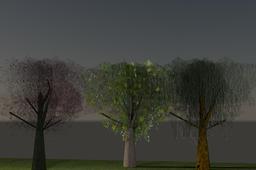
Drawing a 3D tree in AutoCAD (my way)
ugo molinari
in
Modeling
0
0
Intermediate
There are different ways to draw a 3d tree, this is my option. This way consent you to draw the trunk using 3d objects like cone and cylinder and join them in an only object. Then you assign the texture to this and the trunk is done. The difficult is to draw a convincing crown of the tree. My way allow you to do this enough easily. There's a problem: the time of rendering is very long: for one only tree I spend until 30/45 minutes in high resolution, in middle resolution less than 10 minutes.
AutoCAD
rendering
autocad2015
tree