Learn about the GrabCAD Platform
Get to know GrabCAD as an open software platform for Additive Manufacturing
Visit our new homepage
Home
Control
Shop
Streamline Pro
Partner Program
Print
Community
Log in
Library
Challenges
Groups
Questions
Tutorials
Engineers
Blog
Log in
Youssef CHOUAIBI
Mechatronic Engineer
Follow
Hire me
18
followers
Tunisia
Tutorials
About
Models
5
Tutorials
1
More
Followers
18
Following
50
Likes
43
Following
50
Followers
18
Likes
43
Tutorials
Sort by:
Recent
Recent
Most liked
Most viewed
Most commented
How to create Solidworks files from a STEP file
Youssef CHOUAIBI
in
Modeling
0
0
Intermediate
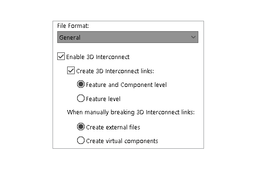
You can just turn off the 3D Interconnect functionality in the SOLIDWORKS software. It is turned on by default. To turn 3D Interconnect off: Click Tools > Options > System Options > Import. In the dialog box, specify File Format to General. Select disable 3D Interconnect.
SOLIDWORKS