Learn about the GrabCAD Platform
Get to know GrabCAD as an open software platform for Additive Manufacturing
Visit our new homepage
Home
Control
Shop
Streamline Pro
Partner Program
Print
Community
Log in
Library
Challenges
Groups
Questions
Tutorials
Engineers
Blog
Log in
ergunay77
Ucuncubinyıl akademi -Design instructor
Follow
Hire me
153
followers
Turkey
Tutorials
About
Models
63
Tutorials
0
More
Followers
153
Following
270
Likes
53
Following
270
Followers
153
Likes
53
Tutorials
Sort by:
Recent
Recent
Most liked
Most viewed
Most commented
Solidworks bounding box
ergunay77
in
Modeling
1
0
Intermediate
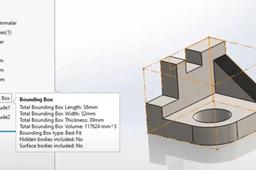
📦 **SolidWorks – Bounding Box Command Tutorial 🎯 **Purpose of the Bounding Box The **Bounding Box** is used to automatically generate a **virtual box** that represents the smallest rectangular box that can fully enclose a part or body. It's useful for: * 📐 Estimating raw material size * 📦 Packaging design * 📊 BOM automation (length, width, height) * 🧾 CNC programming / nesting 🔧 Where to Find the Bounding Box Command 🔹 **SolidWorks Version**: Available in SolidWorks 2018 and later 🔹 **Applicable To**: * Weldment parts (structural members) * Sheet metal parts * Bodies (in multibody parts) 📍 **Location:** * **Insert ➜ Reference Geometry ➜ Bounding Box** * Or, Right-click the **Cut List Item** or **Solid Body Folder** in FeatureManager Tree ➜ *Create Bounding Box* 🧰 **How to Use the Bounding Box Command ✅ Steps: 1. 🖱️ Right-click the **Cut List Item** or the **Solid Body Folder** (e.g., under a weldment or sheet metal part). 2. ➕ Click **Create Bounding Box**. 3. 📏 SolidWorks calculates and displays the smallest 3D box around the selected body. 4. 🧾 The box dimensions appear in the **Cut List Properties** automatically as: * `Bounding Box Length` * `Bounding Box Width` * `Bounding Box Thickness` (or Height) 📝 *Tip:* You can show these values in a drawing BOM using cut list properties. 📌 **Bounding Box Options | Option | Description | | ------------------------ | ------------------------------------------------------------------- | | 🔲 **Best Fit** | Default. Creates the smallest possible box, optimized to the shape. | | ↕️ **Custom Plane** | You can define a specific orientation or plane for the box. | | ✏️ **Manual Adjustment** | Not possible – the box is always auto-calculated by geometry. | 📐 **Using Bounding Box in Drawings 1. Create a **drawing** from the part. 2. Insert a **Cut List Table** (for weldments or sheet metal). 3. Add columns for: * `Bounding Box Length` * `Bounding Box Width` * `Bounding Box Thickness` 4. 🧾 These will auto-populate from the bounding box data. 🧪 **Example
SOLIDWORKS
bounding_box
Solidworks sheet metal sketch bend
ergunay77
in
Modeling
1
0
Intermediate
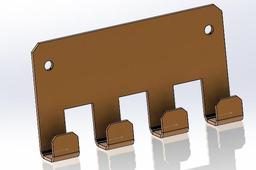
Sheet Metal Design and Press Brake Application in SolidWorks — Training Content Module 1: Introduction to Sheet Metal Design Objectives: Understand the fundamentals of sheet metal parts. Learn about bend allowances, K-factor, and design constraints. Familiarize with sheet metal design standards for manufacturing. Topics Covered: What is Sheet Metal Design? Common Manufacturing Methods (Laser Cutting, Press Brake Bending) Overview of Material Properties Design Guidelines for Sheet Metal Module 2: SolidWorks Sheet Metal Tools Overview Objectives: Explore SolidWorks sheet metal feature set. Understand the difference between solid and sheet metal modeling. Topics Covered: Sheet Metal Toolbar Sheet Metal Parameters: Thickness, Bend Radius, K-Factor Base Flange/Tab, Edge Flange, Hem, Jog, Sketched Bend Flatten and Unflatten Features Exercise: Open a new part. Enable the Sheet Metal tab. Use the Base Flange/Tab feature to create a 2mm thick sheet base. Add Edge Flange to create a simple box shape. Module 3: Creating a Sheet Metal Part Objectives: Create a real-world sheet metal component from scratch. Understand best practices for designing for bending. Step-by-Step: Start with Base Flange/Tab to define the main shape (e.g., rectangular plate). Add Edge Flanges to form sides (adjust angle and length). Add Reliefs for bends (Tear, Obround, or Rectangular). Use Sketched Bend to simulate press brake bends manually. Apply Corner Treatments (Corner Relief, Corner Trim). Check Flat Pattern for laser cutting and press brake compatibility. Module 4: Understanding Bend Calculations Objectives: Learn how SolidWorks calculates bend allowances. Apply correct K-Factor for accurate flat pattern dimensions. Topics Covered: Bend Allowance vs. Bend Deduction K-Factor Explanation (Typical values: 0.3 to 0.5) How to set custom bend tables in SolidWorks Controlling bend direction and bend radius Exercise: Create a U-shaped bracket. Calculate the flat length manually and compare with SolidWorks flat pattern. Modify the K-factor and observe changes. Module 5: Exporting for Manufacturing Objectives: Prepare a design for laser cutting and bending. Generate flat patterns and technical drawings. Topics Covered: Creating 2D Flat Pattern View in Drawings Adding Bend Notes and Bend Lines DXF/DWG Export for Laser Cutting Assigning Bend Directions (Up/Down) Exercise: Generate a drawing of your sheet metal part. Add a Flat Pattern view. Ann
SOLIDWORKS
abkant
sketchbend
sheetmetal
SOLIDWORKS Sheetmetal part nonlineer analysis
ergunay77
in
FEM
2
0
Intermediate
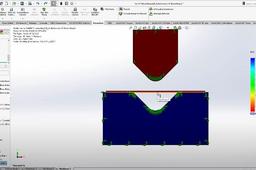
I have prepared a training session on nonlinear bending analysis of sheet metal parts in SolidWorks. In this training, you will be able to easily examine the stress concentration areas of the parts. Based on the analysis results, you will be able to evaluate material piling and tearing. You will also be able to obtain deformation data and prepare detailed reports.
nonlineer
solidworksanalysis
Sweep Spring for mechanism
ergunay77
in
Assemblies
2
0
Expert
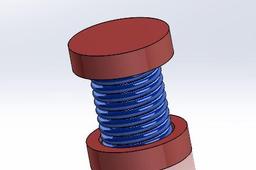
I have prepared a tutorial on creating a spring using the Sweep command and designing a mechanism that opens and closes. By watching and following this tutorial, you can easily create springs and similar opening-closing mechanisms in SolidWorks.
SOLIDWORKS
springmechanism
solidworksspring
spring
Fanuc Roboguide circle program
ergunay77
in
Kinematics
3
2
Intermediate
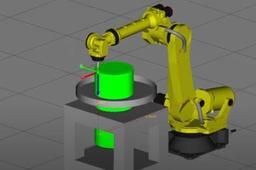
I have prepared a sample training on the use of circular (CIRCLE) movements in the Fanuc industrial robot programming software. Friends who are having trouble or difficulties with this code can watch and easily understand the logic behind CIRCLE programming. for teachpendant
pendant
roboguide
fanuc
Cam follower assembly
ergunay77
in
Assemblies
0
0
Intermediate
You can quickly prepare a sub-assembly of a radial engine lower assembly in SolidWorks using assembly mates. Trying different methods will help you improve. I invite you to follow along. By applying different techniques, you can learn the design modules in SolidWorks at an advanced level using my methods. https://youtu.be/at5PUDZUuOI
SOLIDWORKS
assembly
camfollower
radial engine
ergunay77
in
Assemblies
2
1
Intermediate
In this detailed SolidWorks tutorial, you'll learn how to design, assemble, and animate a classic radial engine step by step. Perfect for beginners and mechanical design enthusiasts alike, this guide will walk you through the entire process using SolidWorks' powerful features. We’ll begin by creating every individual part of the radial engine — from the complex crankcase to the pistons, connecting rods, and other essential components. As you model these parts, you'll become familiar with key SolidWorks tools and best practices for precision mechanical design. Once all components are ready, we'll move into the assembly stage. You'll discover how to use mates to position each part accurately and simulate realistic movement within the engine. This phase will show you how to bring multiple parts together into a fully functioning mechanical assembly. Finally, we’ll explore SolidWorks’ animation capabilities. You’ll learn how to create a motion study to simulate the engine’s operation and visualize the synchronized movement of the pistons and crankshaft — a great way to understand the internal mechanics of a radial engine. By the end of this tutorial, you’ll have a fully modeled, properly assembled, and smoothly animated radial engine. More importantly, you’ll gain solid experience with SolidWorks tools and a deeper appreciation for mechanical design principles.
SOLIDWORKS
radial engine