Learn about the GrabCAD Platform
Get to know GrabCAD as an open software platform for Additive Manufacturing
Visit our new homepage
Home
Control
Shop
Streamline Pro
Partner Program
Print
Community
Log in
Library
Challenges
Groups
Questions
Tutorials
Engineers
Blog
Log in
Roger Couture
designer / sculpture sur neige / enseignes-signs / mecanics / visual arts
Follow
305
followers
Alma, Québec, Canada
Tutorials
About
Models
189
Tutorials
15
More
Followers
305
Following
47
Likes
1673
Following
47
Followers
305
Likes
1673
Tutorials
Sort by:
Recent
Recent
Most liked
Most viewed
Most commented
2D POWERFUL 2D FEATURES
Roger Couture
in
Drafting
0
0
Intermediate
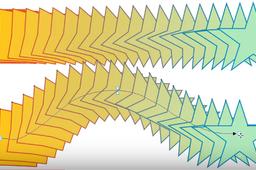
Here an example from CorelDraw: CorelDraw, is able to create "polygonal shape gradients", "contiguous" to traces later "editable". ! Not bad is not it? CorelDraw, est capable de créer des "dégradés de formes polygonales" , "accolés" à des tracés par la suite "éditables". ! Pas mal n'est-ce pas ? https://www.youtube.com/watch?v=VpR_Bzn9tlc&feature=youtu.be
SOLIDWORKS
defrage
2d
DELETE or HIDE A BODY
Roger Couture
in
Modeling
1
0
Expert
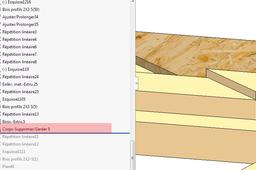
DELETE or HIDE A BODY Often, it is better to remove bodies than to hide them. And the function "Suppress-conserve bodies" can be used from the beginning. It is a question of having only one function of suppression and of reducing it to the end by putting it back down every time one wants to suppress a new body. It will then always be easy to keep a hidden body and find the unique function by removing it from the list of hidden bodies.
SOLIDWORKS
delete
body
hide
Convert splines to arcs tangent for Lasercut
Roger Couture
in
NC Machining
6
0
Expert
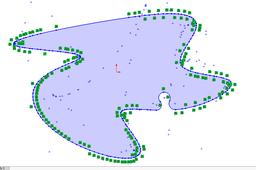
SolidWorks Export DXF in TANGENT ARCS I do not know of a Solidworks macro that can convert "polyline" DXF files into tangent circle arcs. We know that laser machine pilots need it and that some suppliers refuse files containing ellipses splines or only polylines. To export a Solidworks DXF file into tangent arcs, use Draftsight free software distributed by Dassault Systèmes, the owner of SW. Here are the steps you should take to get there efficiently and after a few tries, without much time wasting: Follow theses instructions with steps pictures 1 to 9 1. Export a face, a sketch in DXF taking care to go in the export options and tick the box "POLYLINE". Step 1A, Step1B 2. Download and install DRAFTSIGHT. ... open the DXF file from SW. Step 1C 3. If your export is in spline, you can transform it into pôlylignes with the command "ÉclaterX" (Explode) Step1C1. = F1 4. To remember the procedure, it is only a question of going back to the help of Draftsight menu F1 and to follow the information concerning the poylines and the conversion of these into tangent arches. Step 1D. In fact, the command Adjust (Probably Adjust or Explode in English), this command transforms polylines into tangent arcs into this single function. Step1D and Step2. 5. Save the dxf or dwg and publish it to your client. 6. To import it into SW and or to check it: In order to obtain the tangency between the arcs it is necessary to check the box "ADDING CONSTRAINTS" when importing dxf into SW. Step3 7. And that's the work, Step Last. For me this is a small miracle happening entirely inside SolidWorks! If you consider this procedure too long, know that I lost a lot of time not having known it! Note: I am not an autocad-user. I know you could do it differently and the final parameters like the number of tangent arcs can be adjusted. But this is a procedure that works very well without the help of software that covers most of the needs. SolidWorks Exporter DXF en ARCS TANGEANTS Je ne connais pas de macro Solidworks capable de convertir les fichiers DXF « polylignes » en arcs de cercles tangeants. On sait que les pilotes de machines laser en ont besoin et que certains fournisseurs refusent les fichiers contenant des splines des ellipses ou uniquement des polylignes. Pour exporter un fichier Solidworks DXF en arcs tangeants , utiliser Draftsight un logiciel gratuit distribué par Dassault Systèmes, le propriétaire de SW. Voici les étapes que vous devriez rencontrer pour y arriver de façon efficace et après quelques essais, sans trop de perte de temps : 1. Exporter une face, une esquisse en DXF en prenant soin d’aller dans les options d’exportation et de cocher la case « POLYLINE ». Step 1A, Step1B 2. Télécharger et installer DRAFTSIGHT.…ouvrir le fichier DXF provenant de SW. Step 1C 3. Si votre export est en spline, vous pouvez la transformer en pôlylignes avec la commande « ÉclaterX « (Explode) Step1C1. = F1 4. Pour vous souvenir de la procédure il ne s’agit que de retourner dans l’aide de Draftsight menu F1 et de suivre les informations qui concernent les poylignes et la conversion de celles-ci en arcs tangeants. Step 1D. En fait la commande Ajuster (probably Adjust or Explode in english), cette commande transforme les polylignes en arcs tangeants en cette seule fonction. Step1D et Step2. 5. Sauvegarder le dxf ou dwg et le publier vers votre client. 6. Pour l’importer dans SW et ou le vérifier : Afin d’obtenir la tangeance entre les arcs il faut cocher la case « AJOUTER DES CONTRAINTES » lors de l’importation dxf dans SW. Step3 7. Et voilà l’travail, Step Last. Pour moi il s’agit d’un petit miracle qui se passe entièrement à l’intérieur de SolidWorks ! Si vous considérez cette procédure trop longue, sachez que j’ai perdu énormément de temps à ne pas l’avoir connue ! Remarque: Je ne suis pas un habitué d'autocad. Je sais que vous pourriez procéder autrement et que les paramètres finaux comme le nombre d'arcs tangeants peuvent être ajustés. Mais il s'agit ici d'une procédure qui fonctionne très bien sans l'aide d'un logiciel cad qui couvre la majorité des besoins.
lasercut
tangency
tangent
ars
draftsight
polylines
splines
cnc
Solidworks: Is it possible to have a sketch follow the line of another sketch? (trying to skew image on a flag)
Roger Couture
in
Design & CAD
1
0
Intermediate
It depends on how you work with SW. We can make this flag with a single sketch and one function!
SOLIDWORKS
skew
sketch
Drawing and problem with the parts with different configurations
Roger Couture
in
Design & CAD
0
0
Intermediate
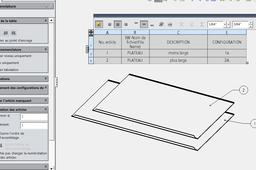
Personally, but this is perhaps not the meaning of your question, when I would do a drawing for each configurations of the same coin, I keep the name of the piece and I highlight in my cartridge name the configuration for the manufacturer understands the difference room.
SOLIDWORKS
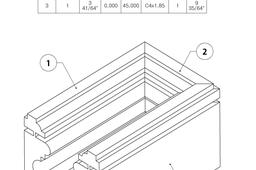
How to create a profile with several sealings as a structural member?
Roger Couture
in
Design & CAD
2
0
Intermediate
See steps
Other
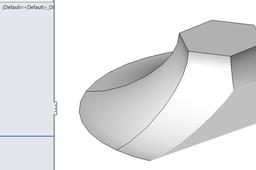
problem in loft between a circle and hexagon
Roger Couture
in
Design & CAD
0
0
Intermediate
You do not need guide curve if you solidly work with surfaces !
Other
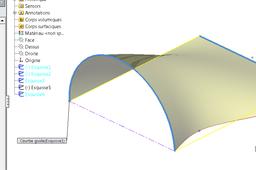
How to use boundary surface function in Solidwork
Roger Couture
in
Design & CAD
1
0
Intermediate
Your drawing shows a confusion between sweeping and smoothing. You can scan a profile to which you give a fig 1,1B trajectory. But smoothing (2 different profiles) is a gradient of an open or closed profile to another profile figure 2A (or even a point fig 2). Only after smoothing (Fig 2b) may be added to smooth scanning guide curves (Fig 5.5A) or directions (Fig 4). Better generally make a different sketch for each curve or profile used. Smoothing is prefered to limit surface that
SOLIDWORKS
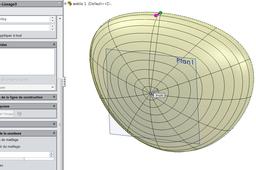
How do I create a surface from a closed non planar spline curve in Solidworks?
Roger Couture
in
Design & CAD
0
0
Intermediate
After remove those 2 points, add a sketch of a point in a new plan and sweep your sketch to this point.
SOLIDWORKS
fill
create
spline
surface
solidworks