Learn about the GrabCAD Platform
Get to know GrabCAD as an open software platform for Additive Manufacturing
Visit our new homepage
Home
Control
Shop
Streamline Pro
Partner Program
Print
Community
Log in
Library
Challenges
Groups
Questions
Tutorials
Engineers
Blog
Log in
Alexa Nahum
Staff member at Stratasys
Follow
17
followers
Israel
Tutorials
About
Models
0
Tutorials
11
More
Followers
17
Following
9
Likes
0
Following
9
Followers
17
Likes
0
Tutorials
Sort by:
Recent
Recent
Most liked
Most viewed
Most commented
POLYJET SUPPORT MATERIALS PART 2: SUP705 & SUP706B
Alexa Nahum
in
3D Printing
4
0
Beginner
Learn the best 3D printing workflow for PolyJet support material SUP705 and SUP706B, including pre-printing design tips for easier support removal to post processing tips.
settings
print
grabcad
sup706b
sup705
material
support
polyjet
3D Printing with PolyJet VeroUltraClear Material
Alexa Nahum
in
3D Printing
8
0
Beginner
VeroUltraClear is a clear, rigid, 3D printing material with a glass-like appearance. Learn how to get the best results for your prototyping needs.
sanding
lacquer
polish
photobleaching
material
polyjet
veroclear
veroultraclear
POLYJET SUPPORT MATERIALS PART 1: INTRO TO POLYJET SUPPORT MATERIAL
Alexa Nahum
in
3D Printing
7
0
Beginner
An introduction the PolyJet's support materials SUP705 SUP710, SUP706B, and SUP707. We discuss unique characteristics and support strength recommendations for each.
grabcad
sup706b
sup707
sup706
sup705
polyjet
material
support
Pre-Printing Tips for PolyJet High-Performance Materials
Alexa Nahum
in
3D Printing
5
0
Beginner
This tutorial gives you tips for how to use Digital ABS Plus, Rigur, and High-Temperature RGD525; PolyJet’s high performance materials for Stratasys printers. You can truly optimize final results for these materials if you know how to best utilize GrabCAD Print settings for part orientation, surface finish, printing mode, and tray preparation. Below, we will show you how.
abs
digital
rigur
materials
high-performance
polyjet
print
grabcad
Matching Up Your Colors with the Pantone™ Color Library
Alexa Nahum
in
3D Printing
1
0
Intermediate
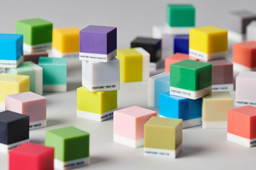
Recently, the Stratasys J7 series began offering the Pantone™ color library on GrabCAD Print. Operators, designers, and manufacturers can now choose Pantone colors straight from GrabCAD Print. This introduces Pantone, the gold standard of color for all industries, into 3D printing and enables color-critical decisions at every stage of the workflow. The ability to use Pantone colors improves and simplifies color communication between designers, modelers, and manufacturers. For the first time in 3D printing history, you can define, communicate, and consistently produce the colors that you work with offline from the world’s most universal and established color language. You can leverage this new feature to create one-click prototypes, models with skin tones, coatings, and any other design-realism need. This improves quality and reliability of prints, cutting time and cost.
printer
stratasys
j750
printing
3d
matching
color
pantone
Pre-printing Tips for Flexible PolyJet Materials
Alexa Nahum
in
3D Printing
13
4
Beginner
PolyJet currently offers a number of flexible materials: Tango and Agilus30 families. This tutorial will provide some tips to optimize the performance of these materials, using the various settings in GrabCAD Print.
surface
orientation
agilus
flexible
materials
polyjet
tango
agilus30
Pre-Printing Tips for Rigid Opaque and Transparent PolyJet Materials
Alexa Nahum
in
3D Printing
13
13
Beginner
This tutorial gives you tips for how to use various rigid materials on Stratasys PolyJet printers. This includes the entire Vero family, as well as the VeroVivids, VeroFlex, VeroClear, and FullCure720 (also known as RGD720). You can truly optimize final results for these materials if you know how to best utilize GrabCAD Print settings for part orientation, printing mode, surface finish, grid style, material selection, tray preparation, and other factors. Below, we will show you how. The information in this tutorial is applicable to GrabCAD Print version 1.32 and above. Older versions may differ slightly.
polyjet
settings
grabcad
vero
fullcure720
veroclear
verflex
verovivid
Pre-Printing tips for PolyJet on GrabCAD Print
Alexa Nahum
in
3D Printing
8
0
Beginner
In this tutorial, we will discuss how to optimize a 3D model in GrabCAD Print before printing it on a PolyJet 3D printer.
printing
pre
pre-printing
orientation
polyjet
considerations
settings
grabcad
Vivid Materials Part 2- How should I use them?
Alexa Nahum
in
3D Printing
2
5
Beginner
Our previous vivid tutorial discussed the expanded capabilities and applications of the new vivid materials. Among the things we mentioned were expanded color selection, increased control over color selection, increased automation in color proofing, brighter whites, smoother color gradients, and of course, transparency and vividness. We explained how this enables applications like rapid prototyping for transparent parts, Perspex® imitations, and transparent vividness for parts like toys and light covers. This tutorial covers the technical specs and explains how to use them to print opaque and transparent parts.
polyjet
dm
vivid
print
connex3
j735
j750
stratasys
The New Vivid Materials: Why Should I Use Them?
Alexa Nahum
in
3D Printing
3
1
Beginner
Stratasys® recently rolled out some new vivid materials for the J750™/J735™ and Connex3 printers. This tutorial will explain what new capabilities these vivids offer and some different ideas for applications. We will be posting a second tutorial that will walk through how to print with the materials.
polyjet
material
vivid
stratasys
transparent
connex3
j735
j750
Matte or Glossy? Which Finish to Use for Your 3D Prints and When.
Alexa Nahum
in
Modeling
9
0
Beginner
Matte or Glossy? That is the question. PolyJet users often ask themselves whether they should print a part with a matte finish or a glossy finish. And not without reason. The type of finish can totally alter the look, feel, color, and even strength and durability of two otherwise identical parts. Each option has its own benefits and implications that need to be considered. In this tutorial we will give an overview of matte and glossy, compare the pros and cons of each, and offer examples that clearly show what each finish type has to contribute. Finally, we will wrap up with a quick breakdown of when to use what.
GrabCAD Print
polyjet
disadvantages
advantages
cons
pros
support
glossy
matte