Learn about the GrabCAD Platform
Get to know GrabCAD as an open software platform for Additive Manufacturing
Visit our new homepage
Home
Control
Shop
Streamline Pro
Partner Program
Print
Community
Log in
Library
Challenges
Groups
Questions
Tutorials
Engineers
Blog
Log in
Sourbh
Plant together.. let's make the world greener again!
Follow
Hire me
331
followers
Chennai, India
Tutorials
About
Models
112
Tutorials
105
More
Followers
331
Following
79
Likes
3748
Following
79
Followers
331
Likes
3748
Tutorials
Sort by:
Most liked
Recent
Most liked
Most viewed
Most commented
Tutorials:-Working with Power MILL "PART IV" Finish Machining Strategies.
Sourbh
in
Design & CAD
2
0
Intermediate
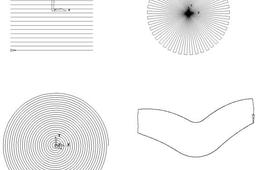
Raster, Radial, Spiral, and Pattern Finishing. Introduction. This section will cover Finishing strategies created by the downward projection of a Pattern, which include four types, Raster, Radial, Spiral and (user defined) Pattern. PowerMILL generates the toolpaths by projecting a wireframe form down the Z-axis onto the model. The standard patterns applied in Raster, Radial, and Spiral are achieved by entering values directly into the Finishing Form. The resultant Pattern can be displayed by selecting Preview before executing the command by selecting Apply. The Pattern option requires a user-defined geometric form (active Pattern), which is projected down Z onto the model as a tool path.
Powermill
suman
sourbh
powermill
clearance
tutorials
educational
cam
power
area
3d
mill
engineering
How to delete project in Workbench ?
Sourbh
in
Design & CAD
1
0
Intermediate
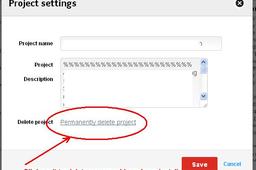
Hello friend, Just go to your project details and click on the "Delete entire project " button as shown in image below..!!
Other
how i can make mold for this part .
Sourbh
in
Design & CAD
1
0
Intermediate
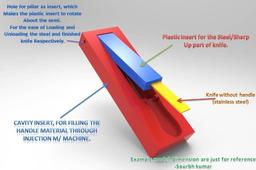
This is sample model, just to let you understand. Feel free if you have any doubt. The semi rotatable plastic insert make your work easier. And with this there is no worry of fall down the loaded part. Easy to eject, Load and unload the component.
SOLIDWORKS
knife
Tutorials:-Working with Power MILL "PART V" Toolpath Leads and Links
Sourbh
in
Design & CAD
1
0
Intermediate
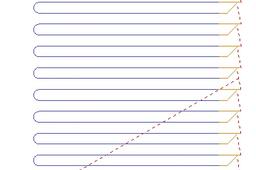
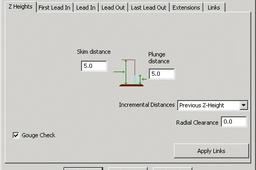
Z Heights Skim and Plunge distance provide variable control of rapid move heights within a component. These operate in conjunction with Safe Z and Start Z to minimize slow and unnecessary movement of the tool in fresh air while machining the component form. Skim distance – An incremental distance above the model at which rapid moves occur from the end of one tool track to the start of the next. The tool rapids across the model clearing the highest point along its route by the Skim value. Plunge distance – An incremental distance above the local component surface where a downward rapid movement of a tool changes to plunge rate.
Powermill
paths
sourbh
powermill
lead
links
tool
Tutorials:-Working with Power MILL "PART V" Toolpath Leads and Links
Sourbh
in
Design & CAD
1
0
Intermediate
Hello Friends, This tutorial continues for power mill Guidance.
Powermill
paths
sourbh
powermill
lead
links
tool
Tutorials:-Working with Power MILL "PART V" Toolpath Leads and Links
Sourbh
in
Design & CAD
1
1
Intermediate
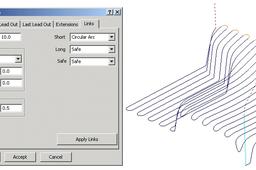
Links To provide for more efficient movement of the tool across the component the link moves that connect adjacent tool tracks can be defined in several different ways. Short/Long Threshold - This defines the distance limit up to which the Short - Links apply. Any move from the end of a tool track to the start of the next, which exceeds this distance is defined as a Long - Link move. For Short links the available options include Safe Z, Incremental, Skim, On Surface, Stepdown, Straight, and Circular Arc. For Long links the available options include Safe Z, Incremental, and Skim. Safe links apply only at the start and end of a toolpath the available options being Safe Z, Incremental, and Skim. For applications where a machine control system will permit arc fitting of rapid moves the Arc Fit Rapid Moves box can be ticked along with a suitable Radius based on the active tool diameter TDU (Of particular benefit to High Speed Machining). •Activate the toolpath 1_1 created earlier in the Leads section. •Set the Leads In and Out to None, if not already set. Press Apply.
Powermill
paths
sourbh
powermill
lead
links
tool
What About The Workbench In Grabcad? I cannot understand What It Do? Thanks.
Sourbh
in
Design & CAD
1
0
Intermediate
Work-bench....!!!! Is a beautiful creature of Grab-cad Member's.
SOLIDWORKS
How do i print a render in solid works in a high quality?
Sourbh
in
Design & CAD
1
0
Intermediate
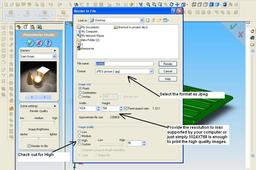
Just change the setting of your render in solid works..!!
SOLIDWORKS
render
print
problem : powermill changes the orientation of files imoprted in igs format from solidworks
Sourbh
in
Design & CAD
1
0
Intermediate
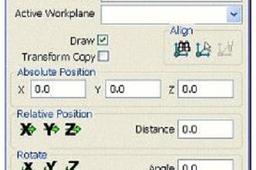
Don't worry about the orientation just simply rotate it through your mouse. and If you are thinking of wrong axis direction than just follow these steps:-
Powermill
solidworks
powermill
How to export solidworks spline points to a .txt file.
Sourbh
in
Design & CAD
1
3
Intermediate
Here am posting the Program code:- Macro to read 3d Sketch points and export to Excel or text file..!! caution this program reads the points in order of creation so you may need to rearrange your data in excel if they are out of order!
SOLIDWORKS
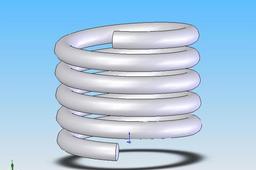
Tutorials:-How to Design Spring in Simple Ways by 1.)Sweeping along Helix
Sourbh
in
Design & CAD
1
0
Beginner
Am telling the process to Create this
SOLIDWORKS
Auto-cad Secret's Exposed.....!!!
Sourbh
in
Design & CAD
0
0
Intermediate
Protect your Customization.
AutoCAD
engineering
innovation
idea
tricks
tips
exposed
sourbh
auto-cad
secrets
How animate a spring in NX ?
Sourbh
in
Design & CAD
0
0
Intermediate
Hi, There is more than you need..!! Go through this.
NX Unigraphics
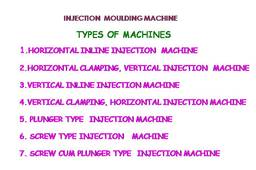
Tutorials on Injection Mould Designing
Sourbh
in
Design & CAD
0
0
Beginner
Types of Injection moulding machine
Other
engineering
mechanical
mould
mold
educational
basic
sourbh
How to delete project in Workbench ?
Sourbh
in
Design & CAD
0
0
Intermediate
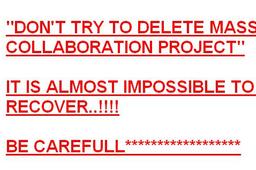
Please don't try to delete MASS Collaboration project in Work-bench. If you wanna out from collaboration or any sharing through work-bench than please tell the Author to remove you. He will remove you securely without any trouble. If you delete the collaboration project means, its too bad for all project's owner to do again so hard work to make it..!! //Thanks//
Other
1
2
3
…
6