Learn about the GrabCAD Platform
Get to know GrabCAD as an open software platform for Additive Manufacturing
Visit our new homepage
Home
Control
Shop
Streamline Pro
Partner Program
Print
Community
Log in
Library
Challenges
Groups
Questions
Tutorials
Engineers
Blog
Log in
Learn from thousands of free Tutorials.
New user?
Join the community
or
log in.
Tutorials
Most liked all time
Recent
Most liked
Most viewed
Most commented
This week
This month
All time
Category
Design & CAD
Modeling
Drafting
Assemblies
BOM
Dimensioning / Tolerancing
Translations
Manufacturing & CAM
3D Printing
Tooling
NC Machining
Composites
Measurement / Inspection
Simulation & CAE
FEM
CFD
Kinematics
Process Simulation
Engineering Fundamentals
Theory
Process
Standards
Other
Software
Snagit
Alibre Design
ArchiCAD
AutoCAD
AutoCAD Electrical
Autodesk 3ds Max
Autodesk Alias
Autodesk Inventor
Autodesk Maya
Autodesk Revit
Autodesk 123D
BricsCAD
Bentley MicroStation
BlenderCAD
BobCAD-CAM
CATIA
Delmia
DraftSight
FreeCAD
Femap
Fusion 360
Geomagic Design
IronCAD
JT
Kompas-3D
KeyCreator
KeyShot
Lagoa
Luxology
Mastercam
Moi3D
NX Unigraphics
OBJ
Onshape
OpenSCAD
Parasolid
Powermill
Powershape
Pro/Engineer Wildfire
PTC Creo Parametric
PTC Creo Elements
Rhino
SpaceClaim
SOLIDWORKS
solidThinking Evolve
Solid Edge
SolidFace
STEP / IGES
SketchUp
STL
TopSolid
TinkerCAD
T-Flex CAD
TurboCAD
VectorWorks
ViaCAD 3D
VRML / WRL
ZW3D
GrabCAD Print
Rendering
GrabCAD Community
GrabCAD Workbench
Text file
3D Manufacturing Format
Cinema 4D
Other
Expert
All levels
Beginner
Intermediate
Expert
drafting
×
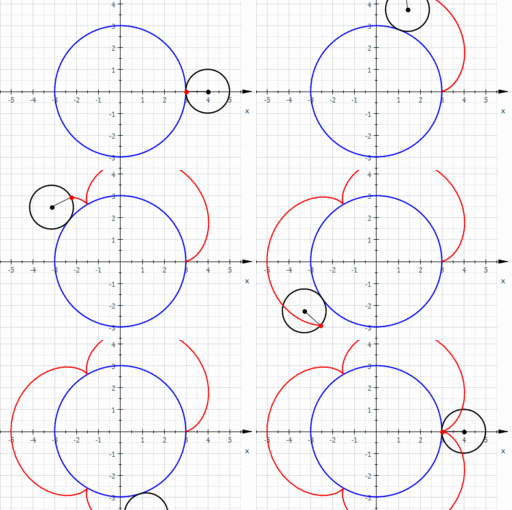
Solidworks tutorial creating a Cycloid Epicycloid Curve
Ayman Ezzat
in
Drafting
3
3
Expert
These curves are very important to draw and understand for each student and engineer as follows:- Epicycloid or hypercycloid is a plane curve produced by tracing the path of a chosen point on the circumference of a circle—called an epicycle—which rolls without slipping around a fixed circle. It is a particular kind of roulette. A cycloid is the curve traced by a point on a circle as it rolls along a straight line without slipping. A cycloid is a specific form of trochoid and is an example of a roulette, a curve generated by a curve rolling on another curve
SOLIDWORKS
curves
drafting
autocad
soldiworks
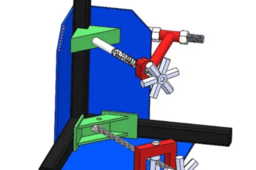
3 AXIS ANGLE WELDING CLAMP ! SOLIDWORKS TUTORIAL 3
MRCAD
in
Modeling
2
0
Expert
Hold parts in position during cool down to minimize distortion due to contraction. Two Quick Acting Screws. “swing away” the 3rd Axis arm for quick and easy part removal. Available in 3.75″ (95 mm) and 4.75″ (120 mm) capacities. Model WAC45-SW comes with a curved arm for greater workpiece clearance. Telegram link - https://t.me/joinchat/jbCTJ5gDeCo3NWE1 Blog: https://www.cadcamtutorial.in/ We will learn the below features or commands in Solidworks. AllSketchTool SketchCondition UnderDefined FullyDefined OverDefined SketchExpert ExtrudeBoss ExtrudeCut RevolveBoss RevolveCut SweepBoss SweepCut PlaneCreation LoftedBoss LoftedCut HoleWizard Fillet chamfer TypesofPatterns #SolidWorksBeginnersTutorials #SolidWorksSketching #SolidWorksSurface #SolidWorksWeldments #SolidWorksAssembly #SolidWorksDrawing #SolidWorksSheetMetal #SolidWorksMoldDesign #SolidWorksSimulation #SolidWorksMotion Please Subscribe to our channel for more videos & projects in Solidworks & d
SOLIDWORKS
weldingclamesolidwork
clamp
welding
angle
axis
beginners
modelling
drafting
tutorial
cam
cad
creation
assembly
sheetmetal
solidworks
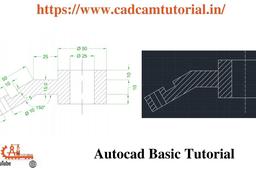
AutoCAD - Complete Tutorial for Beginners - Exercises 48
MRCAD
in
Drafting
1
0
Expert
Telegram link - https://t.me/joinchat/jbCTJ5gDeCo3NWE1 Blog: https://www.cadcamtutorial.in/ FUNCTION KEY:- Ø ESC : To cancel Command Ø F1 : Autocad Help Ø F2 : Text Window on/off To see recently used command, options, Points. Ø F3 : Osnap button on/off. Ø F4 : Tablet on/off (Autocad 2010 & Prior Versions) 3DOSNAP ON/OFF (Autocad 2011 & Autocad 2012) Ø F5 : To change isoplane in isometric drawing. Ø F6 : DUCS (Dynamic user co-ordinate system) button on/off. Ø F7 : Grid button on/off. By default grid spacing is 0.5 inch in X- direction and Y - direction. Ø F8 : Ortho button on/off. Ø F9 : Snap button on/off If snap button is on mode from status bar than cursor will be Jump on the graphic one dot to another dot. Ø F10 : Polar button on/off. (Alternate off ortho button) Ø F11 : Otrack button on/off. (object snap tracking) Ø F12 : DY
AutoCAD
cadcamtutorial
key
function
drafting
48
exercises
beginners
tutorial
complete
autocad
how to create hole table in creo
RMP CAD INSTITUTE
in
Design & CAD
1
1
Expert
in this tutorial i will show you how to create hole table in creo drafting
PTC Creo Parametric
drafting
modelling
table
hole
creo
CATIA V5 Tutorial: Beginner to advanced
ashish kumar
in
Modeling
1
0
Expert
CATIA V5 Tutorial: Beginner to advanced https://www.youtube.com/watch?v=9eNPYFPe8pk&list=PLTkdZKD2ZHsFsWf6kE-GIiSaLFq6tHvkb https://www.youtube.com/channel/UCQn0s06EVrZhbC6gc6DJMTw/featured https://www.youtube.com/channel/UCQn0s06EVrZhbC6gc6DJMTw/videos
CATIA
sheetmetal
drafting
modeling
assembly
tutorial
tricks
advanced
catia
Drawing | SOLIDWORKS | GD&T | Drafting | Manufacturing | Technical Drawings
Avinash Dharampuriya
in
Design & CAD
1
0
Expert
It will let you know to make the pro use of drawings in SolidWorks. Geometric Dimension and Tolerance are the main focus area of this video. Datums creation will be very useful to create a reference for GD&T. Focus on the Detail Drawing keeps learning guys.
SOLIDWORKS
drafting
datum
tolerance
dimensions
geometric
gd-t
drawings
solidworks
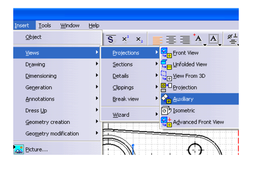
Way to reach the drafting menu
22255d73
in
Drafting
1
0
Expert
The way to reach the drafting menu is as follows.
CATIA
drafting
v6
v5
catia
Solidworks ! Fingers Keyboard Modling - drafting-1
MRCAD
in
Drafting
0
0
Expert
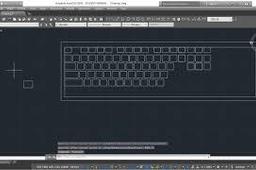
Magnifico Moonlit Wired Keyboard features a slim full-sizedprofile wired keyboard with laser-etched, backlit keys that provide character illumination needed to give you a hassle free typing experience - day and night. Built with high-strength materials,this keyboard is ‘Chaudhvi ka Chand’ in looks and solid in performance! DOWNLOAD THE MODAL : https://engineering624.blogspot.com/2... COMPLET COUESH FOR 100 EXERCISES FUNCTION KEY:- Ø ESC : To cancel Command Ø F1 : Autocad Help Ø F2 : Text Window on/off To see recently used command, options, Points. Ø F3 : Osnap button on/off. Ø F4 : Tablet on/off (Autocad 2010 & Prior Versions) 3DOSNAP ON/OFF (Autocad 2011 & Autocad 2012) Ø F5 : To change isoplane in isometric drawing. Ø F6 : DUCS (Dynamic user co-ordinate system) button on/off. Ø F7 : Grid button on/off. By default grid spacing is 0.5 inch in X- direction and Y direction. Ø F
AutoCAD
drafting
modling
keyboard
fingers
solidworks
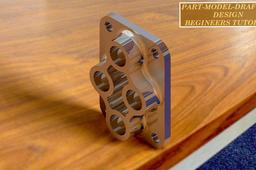
CATIA PART-MODELING AND DRAFTING BEGINNER TUTORIAL
KUMARAVEL M
in
Modeling
0
0
Expert
LEARN CATIA PART-MODELING AND DRAFTING IMPROVE OVER SKILL LEVEL.
CATIA
tools
mechanical
tutorial
gineers
catiabe
drafting
part-modeling
catia