Learn about the GrabCAD Platform
Get to know GrabCAD as an open software platform for Additive Manufacturing
Visit our new homepage
Home
Control
Shop
Streamline Pro
Partner Program
Print
Community
Log in
Library
Challenges
Groups
Questions
Tutorials
Engineers
Blog
Log in
Learn from thousands of free Tutorials.
New user?
Join the community
or
log in.
Tutorials
Most liked all time
Recent
Most liked
Most viewed
Most commented
This week
This month
All time
Category
Design & CAD
Modeling
Drafting
Assemblies
BOM
Dimensioning / Tolerancing
Translations
Manufacturing & CAM
3D Printing
Tooling
NC Machining
Composites
Measurement / Inspection
Simulation & CAE
FEM
CFD
Kinematics
Process Simulation
Engineering Fundamentals
Theory
Process
Standards
Other
Software
Snagit
Alibre Design
ArchiCAD
AutoCAD
AutoCAD Electrical
Autodesk 3ds Max
Autodesk Alias
Autodesk Inventor
Autodesk Maya
Autodesk Revit
Autodesk 123D
BricsCAD
Bentley MicroStation
BlenderCAD
BobCAD-CAM
CATIA
Delmia
DraftSight
FreeCAD
Femap
Fusion 360
Geomagic Design
IronCAD
JT
Kompas-3D
KeyCreator
KeyShot
Lagoa
Luxology
Mastercam
Moi3D
NX Unigraphics
OBJ
Onshape
OpenSCAD
Parasolid
Powermill
Powershape
Pro/Engineer Wildfire
PTC Creo Parametric
PTC Creo Elements
Rhino
SpaceClaim
SOLIDWORKS
solidThinking Evolve
Solid Edge
SolidFace
STEP / IGES
SketchUp
STL
TopSolid
TinkerCAD
T-Flex CAD
TurboCAD
VectorWorks
ViaCAD 3D
VRML / WRL
ZW3D
GrabCAD Print
Rendering
GrabCAD Community
GrabCAD Workbench
Text file
3D Manufacturing Format
Cinema 4D
Other
Skill level
All levels
Beginner
Intermediate
Expert
Design & CAD
×
Modeling
×
Process Simulation
×
CATIA v5 - Parte 023: aprendizaje gestual
Marcelo Valderrey
in
Design & CAD
73
0
Beginner
Computer Aided Three-dimensional Interactive Application (CATIA v5): Generative Drafting: Getting Started 1. Volviendo al principio formal luego de nuestros primeros pasos gestuales. ¿Por qué ver al final lo que CATIA propone como 1er paso? Porque los trayectos elementales que vimos, de forma gestual, nos dejaron la necesaria autonomía para revisar la extensa información formal que trae CATIA, y que a muchos usuarios puede resultarles agobiante al principio. Sin dudas, la mejor información sobre CATIA está en su detallado HELP, cuya estructura es inevitablemente compleja y debe aprender a usarse para que rinda sus frutos.
CATIA
aprender imitando
CATIA v5 - Parte 015: aprendizaje gestual
Marcelo Valderrey
in
Design & CAD
73
0
Beginner
Computer Aided Three-dimensional Interactive Application (CATIA v5): Help: LOCATION; HOMEPAGE; WORKBENCHES; SITE MAP & SPLIT VIEW; OVERVIEW & IN A NUTSHELL; GETTING STARTED; USER TASKS; WORKBENCH DESCRIPTION; CUSTOMIZING; FAQ, GLOSSARY & INDEX
CATIA
aprender imitando
CATIA v5 - Parte 012: aprendizaje gestual
Marcelo Valderrey
in
Design & CAD
73
0
Beginner
Computer Aided Three-dimensional Interactive Application (CATIA v5): Infrastructure: OPEN FILE > BMP & PART; SAVE PART & SAVE AS IGES; OPEN FILE > IGES & PART; Part Design: PROPERTIES > PART NAME; PROPERTIES > FEATURE NAME; APPLY MATERIAL & SHADING WITH.
CATIA
aprender imitando
CATIA v5 - Parte 007: aprendizaje gestual
Marcelo Valderrey
in
Design & CAD
73
0
Beginner
Computer Aided Three-dimensional Interactive Application (CATIA v5): Se oscureció la pantalla; el compás se pegó a la pieza; desapareció la pieza; se perdieron los menús.
CATIA
aprender imitando
CATIA v5 - Parte 005: aprendizaje gestual
Marcelo Valderrey
in
Design & CAD
73
0
Beginner
Computer Aided Three-dimensional Interactive Application (CATIA v5): Borrar vs Desactivar; Croquis ISO desde cero.
CATIA
aprender imitando
CATIA v5 - Parte 002: aprendizaje gestual
Marcelo Valderrey
in
Design & CAD
73
0
Beginner
Computer Aided Three-dimensional Interactive Application (CATIA v5): Crear nuevas partes; Manipular los favoritos.
CATIA
aprender imitando
CATIA v5 - Parte 017: aprendizaje gestual
Marcelo Valderrey
in
Design & CAD
73
0
Beginner
Computer Aided Three-dimensional Interactive Application (CATIA v5): Assembly Design: NEW FILE; INSERT EXISTING COMPONENT; FIX CONSTRAINT; COINCIDENCE CONSTRAINT; OFFSET CONSTRAINT; RENAME & SAVE PRODUCT
CATIA
aprender imitando
CATIA v5 - Parte 018: aprendizaje gestual
Marcelo Valderrey
in
Design & CAD
73
0
Beginner
Computer Aided Three-dimensional Interactive Application (CATIA v5): Crear un nuevo conjunto con partes y subconjuntos; Colocar restricciones y usar el compas para mover componentes; Usar el comando MANIPULATION para mover componentes; Editar nombres de componentes, productos y sus archivos
CATIA
aprender imitando
CATIA v5 - Parte 024: aprendizaje gestual
Marcelo Valderrey
in
Design & CAD
72
0
Beginner
Computer Aided Three-dimensional Interactive Application (CATIA v5): Generative Drafting: Getting Started 2. Volviendo al principio formal luego de nuestros primeros pasos gestuales. Porque sin dudas, la mejor información sobre CATIA está en su detallado HELP, que es una gran herramienta de estructura compleja: necesitamos conocerla, explorarla y acostumbrarnos a su uso permanente. De otro modo, su extensión y complejidad podrían darnos la sensación de poca practicidad y gran dificultad de acceso a lo específicamente buscado.
CATIA
aprender imitando
Amazing Dynamic foldable tabel in solidworks
Amit Mourya
in
Assemblies
72
6
Beginner
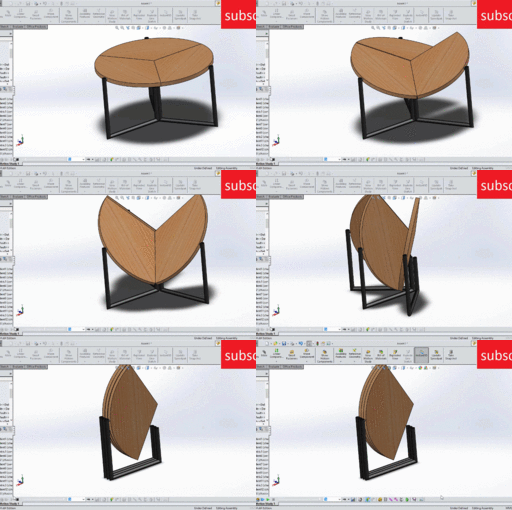
Support us on paypal so we can create better content : paypal.me/nobodyknow137 circular table is folding here is shown it is quite interesting new mechanism The advantage of this mechanism it take less space as compare to other it is easy to fold if you compare with other ones easy to fold less space good interior design material interior design cool impression on guest cool solidworks project for dynamic analysis
SOLIDWORKS
interior
analysis
motion
animation
design
interesting
foldable
dynamic
solidworks
table
folding
CATIA v5 - Parte 008: aprendizaje gestual
Marcelo Valderrey
in
Design & CAD
72
0
Beginner
Computer Aided Three-dimensional Interactive Application (CATIA v5): Dibujemos una pieza; hagamos una forma simple en SKETCHER; y en el PART DESIGN hagamos un PAD, DRAF, FILLET, MIRROR, HOLE, SHELL; revisemos el INFRASTRUCTURE para las GRAPHIC PROPERTIES y VIEWING OBJETCS.
CATIA
aprender imitando
Convert STL (or OBJ) Mesh to SOLIDWORKS Model (NURBS)
FredSWUG
in
Modeling
72
12
Intermediate
Need to convert an STL (or OBJ) file into a "real CAD model"? There are several tutorials which already exists for this topic. I'm making a new tutorial to give additional information.
SOLIDWORKS
part
convert
model
sldprt
mesh
stl
LEGO - 01 Basic Dimensions & Bricks Explained
dk
in
Modeling
71
9
Intermediate
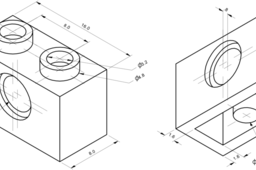
I get a lot of questions about how I create LEGO parts. This is Part I - The Basics. Most "standard" parts can be created using only simple math. Standard parts consist of square, circular, and angled blocks - regular geometric blocks. I will refer to BrickLink (www.bricklink.com/), but many others use similar methods: Peeron: http://www.peeron.com/ BrickOwl: http://www.brickowl.com/ Brickipedia: http://lego.wikia.com/wiki/LEGO_Wiki etc.
Autodesk Inventor
bricks
dimensions
lego
Cap screws and machine screws
dea
in
Drafting
69
12
Intermediate
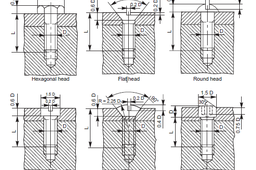
Cap screws and machine screws are similar in shape, differing only in their relative sizes. Machine screws are usually smaller in size, compared to cap screws. These are used for fastening two parts, one with clearance hole and the other with tapped hole. The clearance of the unthreaded hole need not be shown on the drawing as its presence is obvious. Figure 5.24 shows different types of cap and machine screws, with proportions marked Cap screws are produced in finish form and are used on machines where accuracy and appearance are important. As cap screws are inferior to studs, they are used only on machines requiring few adjustments and are not suitable where frequent removal is necessary. These are produced in different diameters, upto a maximum of 100 mm and lengths 250 mm. Machine screws are produced with a naturally bright finish and are not heat treated. They are particularly adopted for screwing into thin materials and the smaller ones are threaded throughout the length. They are used in fire-arms, jigs, fixture and dies. They are produced in different diameters upto a maximum of 20 mm and lengths upto 50 mm.
Autodesk Inventor
screw
cap
SOLIDWORKS TUTORIAL : DESIGN A NISSAN GTR.
Rare Mechanic
in
Modeling
62
4
Intermediate
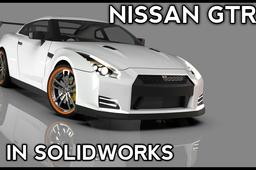
Hey designer, Hope you going well in your designing Journey. I've made a complete step by step tutorial in which you're going to design a 'NISSAN GTR" in solidworks. . Start this tutorial series & enhanced your surfacing skills by completing it.
SOLIDWORKS
tutorial
cardesigning
advancedsurfacing
solidworkstutorial
design
nissangtr
automobile
cad
1
2
3
4
…
100